> ## Documentation Index
> Fetch the complete documentation index at: https://docs.joinkatalyst.com/llms.txt
> Use this file to discover all available pages before exploring further.
# Bulk-clean AI Suggestions sweep
> Clean the volt-lime rings out of an Opportunities or Accounts table in one focused pass: bulk-accept the obvious, drill into the rest, leave the table tidy.
# Bulk-clean AI Suggestions sweep
A rep opens [Opportunities](../product/plan/opportunities) and the table is dotted with volt-lime rings on individual cells: AI Suggestions waiting on a decision. This play is the 10-minute sweep that resolves the rings in one focused pass: bulk-accept the high-confidence ones, drill into the rest to read the AI's reasoning, accept or reject each, and confirm the table is clean before moving on.
## What to expect
* **Timing.** Roughly 10 minutes for a 40-row sweep.
* **Prerequisite.** A volt-lime ring is visible on at least three cells in [Opportunities](../product/plan/opportunities) or the [Accounts](../product/research/accounts) table. AI Suggestions is on for the org and the rep is the owner on the rows.
* **Outcome.** A clean table, no volt-lime rings remaining, every suggestion either accepted into Salesforce or rejected with reasoning captured.
## Step-by-step
1. **Open [Opportunities](../product/plan/opportunities) and load a saved view.** The rep's daily view, or a stage-narrowed view like "Mine, Negotiation or Proposal," scopes the sweep to the rows that matter. The volt-lime rings on individual cells flag the AI Suggestions waiting on a decision.
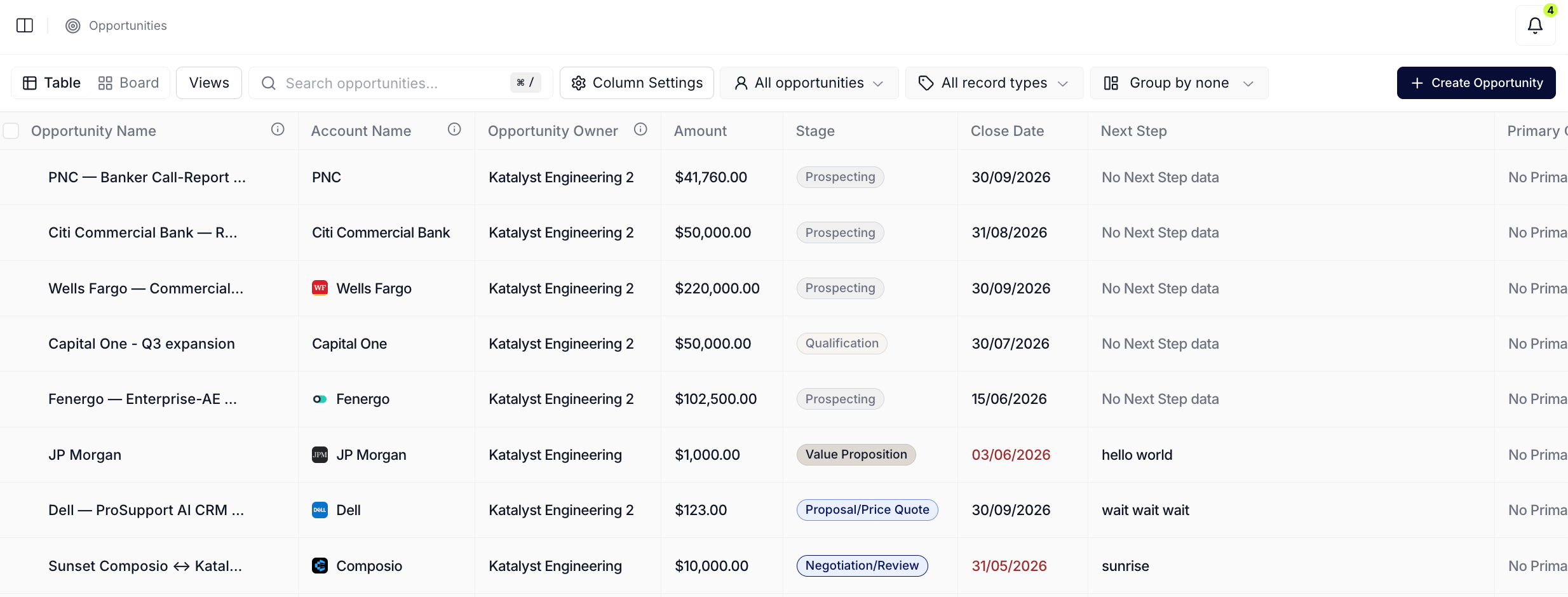 2. **Scan for the obvious ones.** A volt-lime ring on a Close Date the rep already pushed in their head, a Next Step that matches the meeting notes from yesterday, a Stage that's clearly behind reality, those are the bulk-accept candidates. The rep eyeballs the rings and lines up a mental shortlist.
3. **Multi-select the high-confidence rows.** Check the row-level checkboxes for the deals whose suggestions the rep is confident on. The floating bulk bar appears at the bottom; the suggestion count chip carries the running total of pending AI Suggestions across the selected rows.
4. **Bulk accept from the floating bar.** Click Approve N. The accepts fan out in batches; volt-lime rings on the resolved cells clear in place as Salesforce confirms each write. Failed cells (rare) stay ringed so the rep can retry one-by-one.
2. **Scan for the obvious ones.** A volt-lime ring on a Close Date the rep already pushed in their head, a Next Step that matches the meeting notes from yesterday, a Stage that's clearly behind reality, those are the bulk-accept candidates. The rep eyeballs the rings and lines up a mental shortlist.
3. **Multi-select the high-confidence rows.** Check the row-level checkboxes for the deals whose suggestions the rep is confident on. The floating bulk bar appears at the bottom; the suggestion count chip carries the running total of pending AI Suggestions across the selected rows.
4. **Bulk accept from the floating bar.** Click Approve N. The accepts fan out in batches; volt-lime rings on the resolved cells clear in place as Salesforce confirms each write. Failed cells (rare) stay ringed so the rep can retry one-by-one.
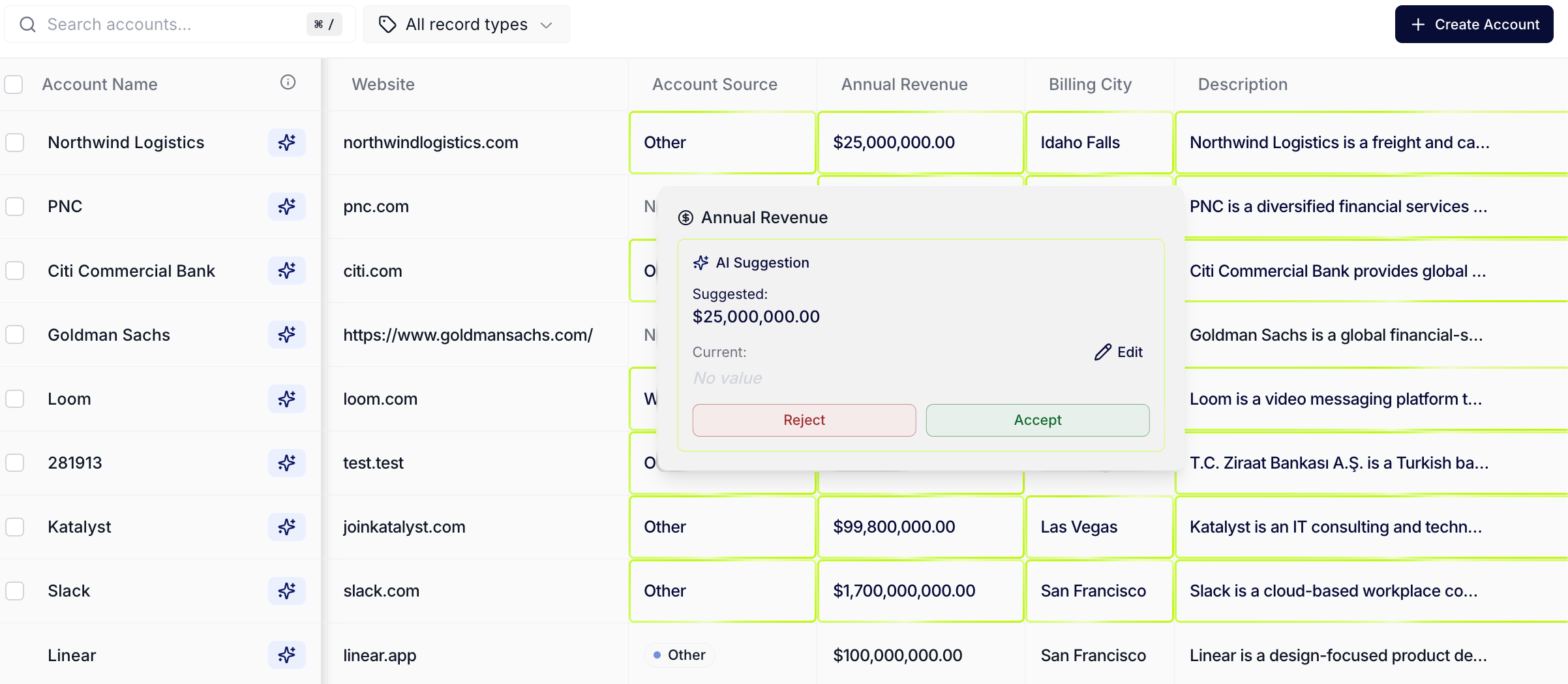 5. **Drill into the remaining rings.** For each cell that still has a ring, click into it. The per-cell modal opens with the proposed change on top (old value to new value) and the AI's reasoning below. The rep reads the reasoning before deciding.
6. **Accept or reject one-by-one.** For each ringed cell, accept if the reasoning holds, reject if the rep knows better. Accepts write through to Salesforce on the same path the bulk bar uses; rejects clear the ring without writing. Move to the next ringed cell and repeat.
7. **Confirm the rings have cleared.** Scroll the table top-to-bottom. Every cell should be ring-free. If a ring reappears later in the session, it's a new AI Suggestion that fired against fresh signal data, run the sweep again at the rep's next sit-down moment.
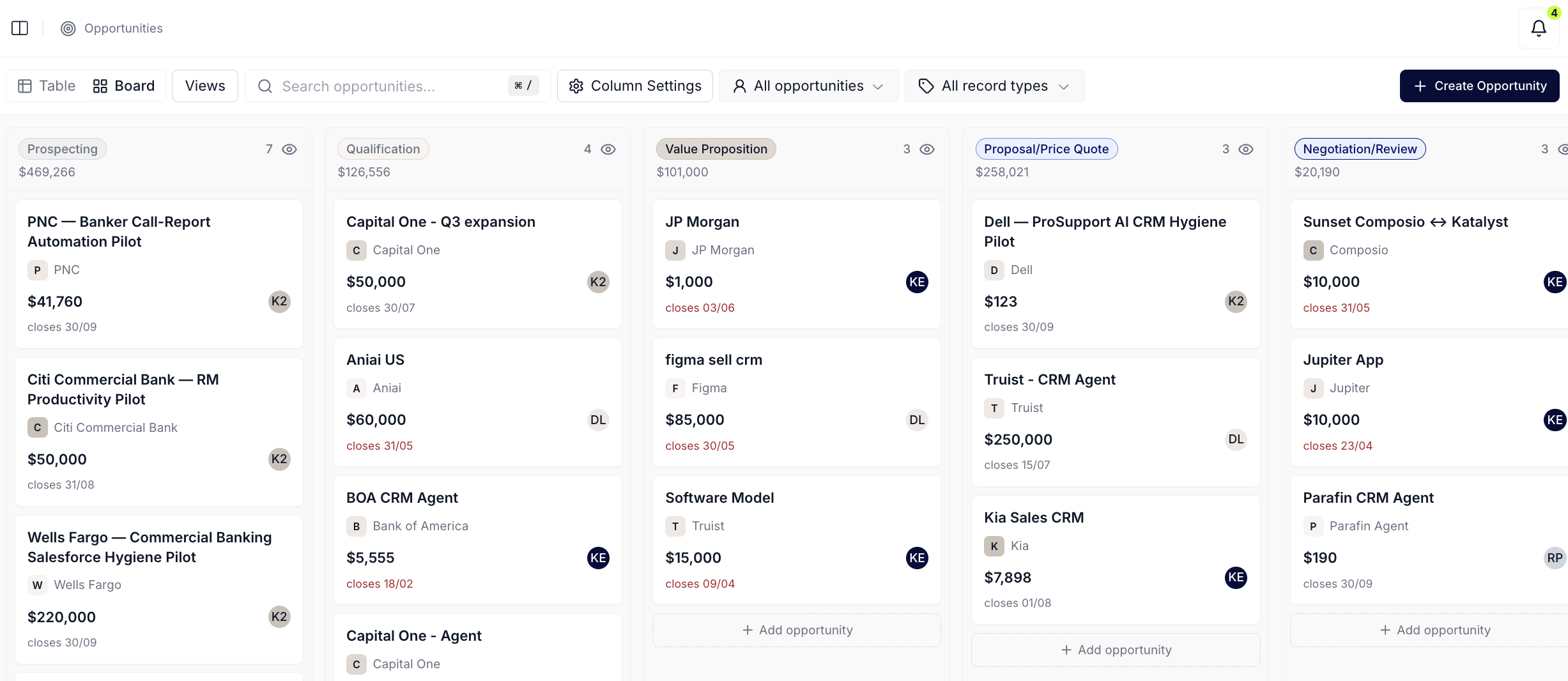
8. **(Optional) Flip to Board layout for a final read.** Toggle Layout to Board. The kanban view shows currency totals per stage with no per-cell rings (the volt-lime ring is a table affordance); use this view to confirm the deals landed in the right lanes after the bulk accept.
5. **Drill into the remaining rings.** For each cell that still has a ring, click into it. The per-cell modal opens with the proposed change on top (old value to new value) and the AI's reasoning below. The rep reads the reasoning before deciding.
6. **Accept or reject one-by-one.** For each ringed cell, accept if the reasoning holds, reject if the rep knows better. Accepts write through to Salesforce on the same path the bulk bar uses; rejects clear the ring without writing. Move to the next ringed cell and repeat.
7. **Confirm the rings have cleared.** Scroll the table top-to-bottom. Every cell should be ring-free. If a ring reappears later in the session, it's a new AI Suggestion that fired against fresh signal data, run the sweep again at the rep's next sit-down moment.
8. **(Optional) Flip to Board layout for a final read.** Toggle Layout to Board. The kanban view shows currency totals per stage with no per-cell rings (the volt-lime ring is a table affordance); use this view to confirm the deals landed in the right lanes after the bulk accept.
 ## Variations
If the sweep is on the [Accounts](../product/research/accounts) table instead, the affordance is identical: the same volt-lime ring on per-cell suggestions, the same bulk bar, the same per-cell modal. The Accounts sweep usually concentrates on enrichment fields (industry, employee count, segment) and is faster per-cell because the rep is rejecting less. If the rep wants to look at the same pending decisions in inbox form instead of in-context, run [Knock out today's actions](./knock-out-todays-actions) and work the Actions queue; same underlying rows, different surface.
## Related
* [AI Suggestions](../product/engage/ai-suggestions) - the per-cell volt-lime ring overlay this play resolves.
* [Opportunities](../product/plan/opportunities) - the table the sweep usually runs on.
* [Accounts](../product/research/accounts) - the other table the sweep runs on, usually for enrichment fields.
* [Actions](../product/engage/actions) - the inbox-style cousin of this play; same underlying decisions, different surface.
* [Knock out today's actions](./knock-out-todays-actions) - the morning batch-decide play that lives in the Actions queue.
## Variations
If the sweep is on the [Accounts](../product/research/accounts) table instead, the affordance is identical: the same volt-lime ring on per-cell suggestions, the same bulk bar, the same per-cell modal. The Accounts sweep usually concentrates on enrichment fields (industry, employee count, segment) and is faster per-cell because the rep is rejecting less. If the rep wants to look at the same pending decisions in inbox form instead of in-context, run [Knock out today's actions](./knock-out-todays-actions) and work the Actions queue; same underlying rows, different surface.
## Related
* [AI Suggestions](../product/engage/ai-suggestions) - the per-cell volt-lime ring overlay this play resolves.
* [Opportunities](../product/plan/opportunities) - the table the sweep usually runs on.
* [Accounts](../product/research/accounts) - the other table the sweep runs on, usually for enrichment fields.
* [Actions](../product/engage/actions) - the inbox-style cousin of this play; same underlying decisions, different surface.
* [Knock out today's actions](./knock-out-todays-actions) - the morning batch-decide play that lives in the Actions queue.