> ## Documentation Index
> Fetch the complete documentation index at: https://docs.joinkatalyst.com/llms.txt
> Use this file to discover all available pages before exploring further.
# Manage your plan and credits
> The admin's twenty minutes: size the plan, set the seat count, and turn on auto-recharge so nobody hits an out-of-credits wall mid-week.
# Manage your plan and credits
Most of what an admin does in Katalyst is invisible to the team, and that's the goal. The team should never discover the plan by hitting a wall in it. This play is the twenty minutes that make that true: size the plan honestly, set the credit safety net, and know what each charge covers before finance asks.
## What to expect
* **Timing.** 20 minutes for the initial setup, 10 minutes a month afterwards.
* **Prerequisite.** Admin role. A card on file, or one to hand.
* **Outcome.** A plan sized to the team, seats that don't block invitations, credits that top themselves up within a cap you set, and an invoice trail you can hand to finance without a support ticket.
## Step-by-step
1. **Understand the two axes before you price anything.** Katalyst charges for **platform coverage** (an org-wide count of AI-active opportunities) and for **seats** (a per-rep tier that sets what each person can do). These are independent. A small team working a big book and a big team working a small book are different shapes, and the pricing lets you say so.
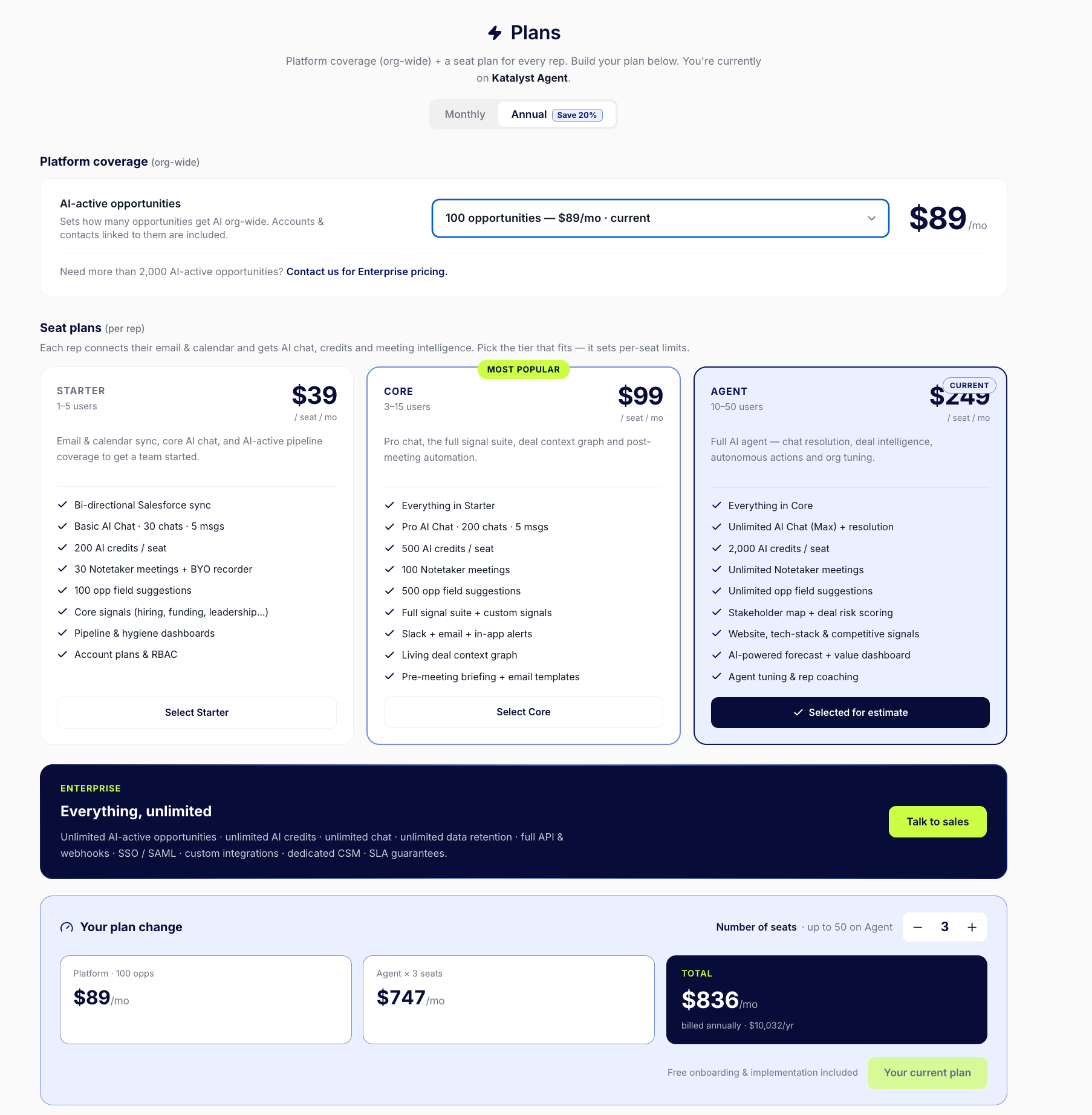 2. **Pick the seat tier on capability, not on price.** The tiers gate real things: the full signal suite and custom signals, Slack delivery, pre-meeting briefs, and the size of each rep's chat allowance all start at Core. Agent adds unlimited chat, stakeholder mapping, and competitive signals. Read what your team will actually reach for, then buy that.
3. **Set the seat count, and watch the ceiling.** The stepper clamps to your tier's maximum and labels it inline. If you need more seats than the tier allows, you find out here rather than when an invitation fails in three weeks.
4. **Read the estimate before you commit.** The plan-change panel breaks the total into platform plus seats. Toggle annual to see the discount. When you confirm, a modal shows the exact charge or credit: upgrades apply immediately, downgrades are scheduled for the end of the period, so there is no advantage to timing a downgrade carefully.
5. **Turn on auto-recharge with a cap you are comfortable with.** This is the step that prevents the most common bad day: a rep runs out of credits mid-draft on a Wednesday and the product simply stops. Auto-recharge buys more automatically when the monthly allowance runs out, up to a monthly ceiling you set. The cap means it cannot run away from you.
2. **Pick the seat tier on capability, not on price.** The tiers gate real things: the full signal suite and custom signals, Slack delivery, pre-meeting briefs, and the size of each rep's chat allowance all start at Core. Agent adds unlimited chat, stakeholder mapping, and competitive signals. Read what your team will actually reach for, then buy that.
3. **Set the seat count, and watch the ceiling.** The stepper clamps to your tier's maximum and labels it inline. If you need more seats than the tier allows, you find out here rather than when an invitation fails in three weeks.
4. **Read the estimate before you commit.** The plan-change panel breaks the total into platform plus seats. Toggle annual to see the discount. When you confirm, a modal shows the exact charge or credit: upgrades apply immediately, downgrades are scheduled for the end of the period, so there is no advantage to timing a downgrade carefully.
5. **Turn on auto-recharge with a cap you are comfortable with.** This is the step that prevents the most common bad day: a rep runs out of credits mid-draft on a Wednesday and the product simply stops. Auto-recharge buys more automatically when the monthly allowance runs out, up to a monthly ceiling you set. The cap means it cannot run away from you.
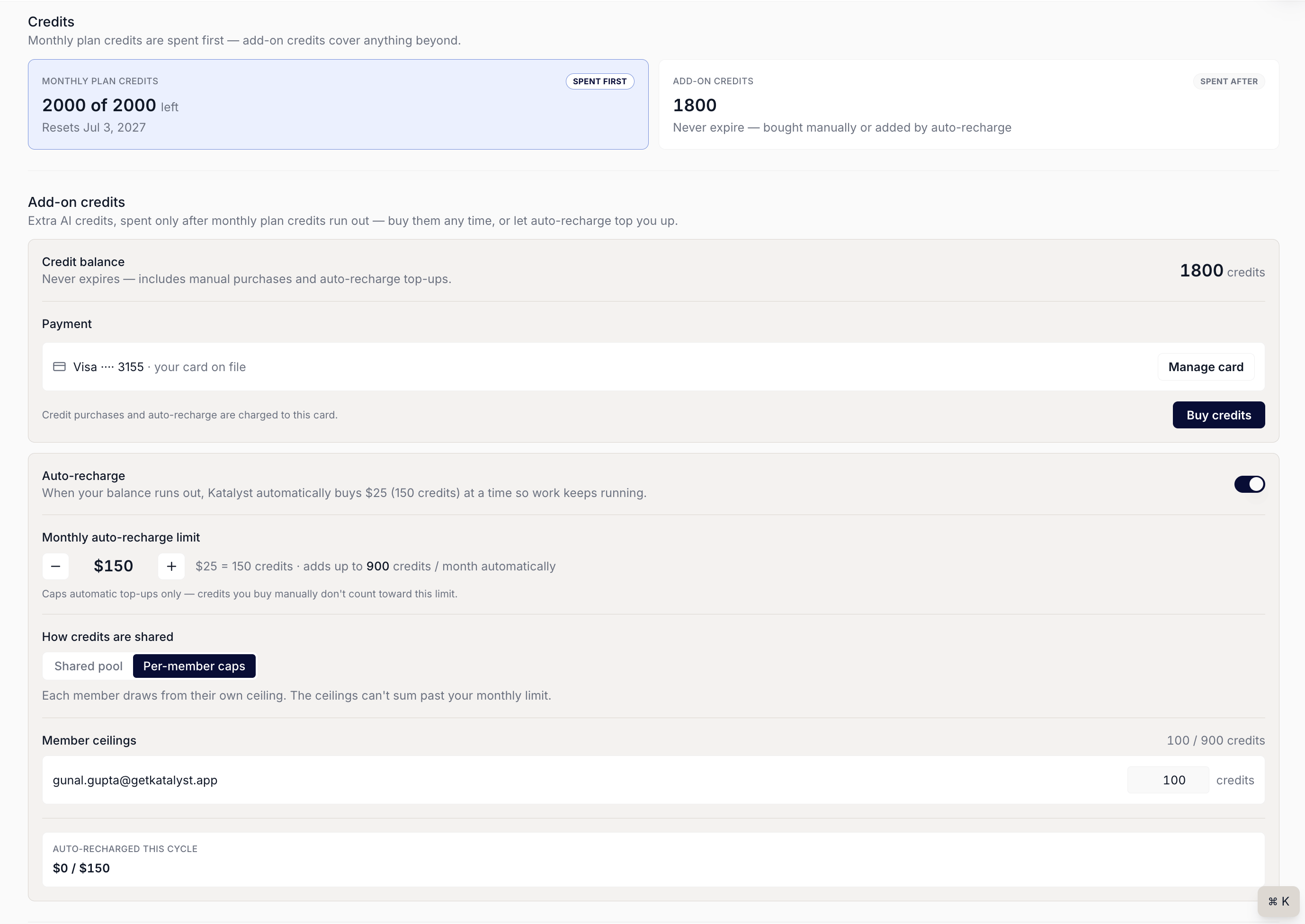 6. **Decide how credits are shared.** A shared pool is simpler and fine on a small team where usage is even. Per-member ceilings are the safer default once the team is big enough that one power user can drain the month. The ceilings cannot sum past your monthly limit.
7. **Know where the invoices live.** The Billing page carries the full invoice history with PDF downloads and a line-by-line breakdown of what each charge covers. When finance asks at quarter close, this is a two-minute answer rather than a support thread.
## Patterns that work
**Buy the safety net before you need it.** Auto-recharge with a cap costs nothing until it is used, and the alternative is a rep losing a thread mid-week and quietly deciding the tool is unreliable. Turn it on during setup, not after the first outage.
**Size coverage narrow and seats honestly.** The two mistakes pull in opposite directions. Teams over-buy coverage on instinct (turn everything on) and under-buy seats to save money (leaving reps on a tier that cannot do what you told them it would). Do the opposite of both.
**Downgrade whenever, upgrade whenever.** Upgrades land immediately because you want the capability now. Downgrades wait for the period boundary, so there is no clever timing to do and no risk of cutting the team off mid-cycle by accident.
**Watch for the payment banner, because your team will.** A failed payment puts a warning banner across the top of the app for everyone. Reps see it before they see an email from you. Keeping the card current is a team-morale task disguised as an admin task.
## Related
* [Plans and Billing](../product/setup/plans-and-billing) - the surface this play runs on.
* [AI-active coverage](../product/setup/ai-active-coverage) - the other half of the sizing decision.
* [Team and permissions](../product/setup/team-and-permissions) - seats, invitations, and what happens when they run out.
* [Home](../product/plan/home) - where reps feel the chat allowance the plan sets.
* [Choose which deals get AI](./choose-which-deals-get-ai) - the coverage play this pairs with.
* [Audit team permissions quarterly](./audit-team-permissions-quarterly) - the sibling quarterly admin review.
6. **Decide how credits are shared.** A shared pool is simpler and fine on a small team where usage is even. Per-member ceilings are the safer default once the team is big enough that one power user can drain the month. The ceilings cannot sum past your monthly limit.
7. **Know where the invoices live.** The Billing page carries the full invoice history with PDF downloads and a line-by-line breakdown of what each charge covers. When finance asks at quarter close, this is a two-minute answer rather than a support thread.
## Patterns that work
**Buy the safety net before you need it.** Auto-recharge with a cap costs nothing until it is used, and the alternative is a rep losing a thread mid-week and quietly deciding the tool is unreliable. Turn it on during setup, not after the first outage.
**Size coverage narrow and seats honestly.** The two mistakes pull in opposite directions. Teams over-buy coverage on instinct (turn everything on) and under-buy seats to save money (leaving reps on a tier that cannot do what you told them it would). Do the opposite of both.
**Downgrade whenever, upgrade whenever.** Upgrades land immediately because you want the capability now. Downgrades wait for the period boundary, so there is no clever timing to do and no risk of cutting the team off mid-cycle by accident.
**Watch for the payment banner, because your team will.** A failed payment puts a warning banner across the top of the app for everyone. Reps see it before they see an email from you. Keeping the card current is a team-morale task disguised as an admin task.
## Related
* [Plans and Billing](../product/setup/plans-and-billing) - the surface this play runs on.
* [AI-active coverage](../product/setup/ai-active-coverage) - the other half of the sizing decision.
* [Team and permissions](../product/setup/team-and-permissions) - seats, invitations, and what happens when they run out.
* [Home](../product/plan/home) - where reps feel the chat allowance the plan sets.
* [Choose which deals get AI](./choose-which-deals-get-ai) - the coverage play this pairs with.
* [Audit team permissions quarterly](./audit-team-permissions-quarterly) - the sibling quarterly admin review.