> ## Documentation Index
> Fetch the complete documentation index at: https://docs.joinkatalyst.com/llms.txt
> Use this file to discover all available pages before exploring further.
# Turn a meeting into a deal
> A call surfaced a new opportunity. Katalyst already drafted the Salesforce records. Three minutes to check the reasoning and approve, instead of twenty minutes of CRM data entry.
# Turn a meeting into a deal
A discovery call ends and something new came out of it: a second business unit is evaluating, or a conversation that was never on the pipeline turns out to be a real deal. The old cost of that good news was twenty minutes in Salesforce, standing up an account, creating contacts, opening an opportunity, and wiring the links between them, usually the next morning, usually half-remembered.
Katalyst detects the deal from the meeting itself and drafts every record for you. This play is the three minutes it takes to check its work and approve.
## What to expect
* **Timing.** 2 to 5 minutes per suggestion, usually within an hour of the call ending.
* **Prerequisite.** The meeting had a notetaker on it (or a transcript synced from your recorder), and the org is within its plan's limit on AI-detected records from meetings.
* **Outcome.** A new opportunity in Salesforce with its account, contacts, and links created and synced, or a deliberate rejection, made with the reasoning in front of you rather than from memory.
## Step-by-step
1. **Let the meeting finish and leave it alone.** There is nothing to do in the room. The notetaker captures the call, Katalyst reads it, and if it finds a commercial initiative that doesn't map to an existing opportunity, it proposes one. If the meeting instead belongs against a deal you already have, it proposes the link rather than a duplicate.
2. **Find the suggestion in the Actions queue.** It lands as its own row in the To Review tab, labelled with the meeting it came from, so you can tell at a glance that this one came out of a conversation rather than from a field-update sweep. Open the queue when you next sit down; there's no need to break the day for it.
3. **Expand the row and read the proposal, not just the title.** The drawer shows the exact Salesforce records that would be created, the account, each contact, the opportunity, and the links between them, each one listed as a discrete write. The count at the top ("creates 3 records in Salesforce") tells you the blast radius before you agree to anything.
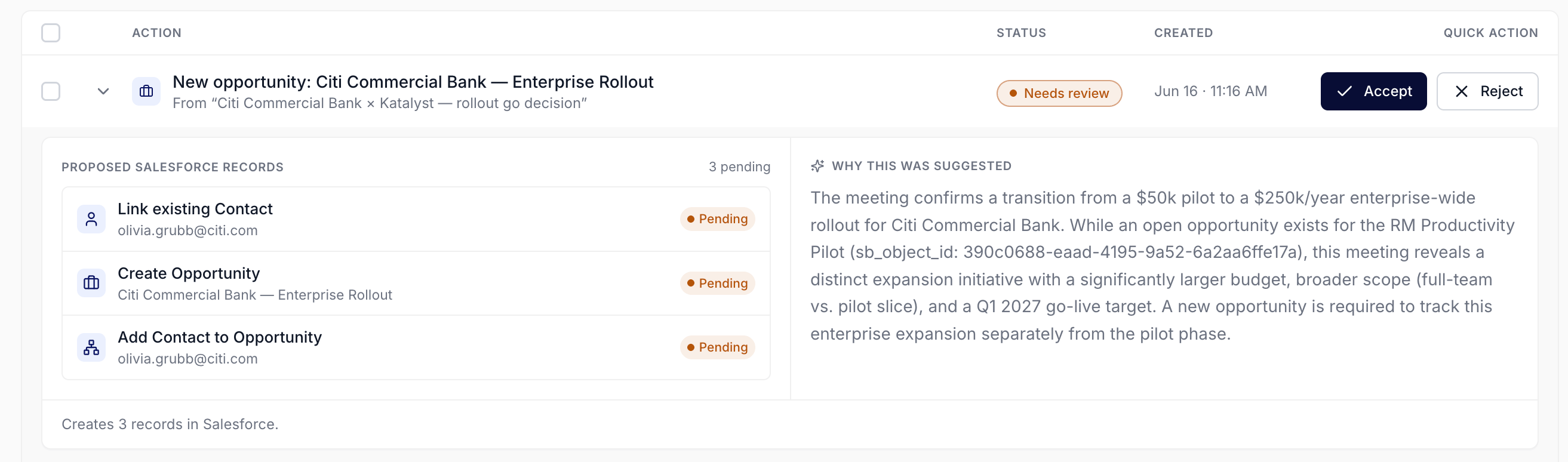 4. **Read the reasoning, and check it against what you remember.** The right pane explains why Katalyst thinks this is a distinct deal: the budget discussed, the scope, the timeline, and why it doesn't fold into an opportunity you already have. This is the step that matters. You were in the room; the reasoning is a claim about what happened in it. If it says the pilot expanded from a $50k slice to a $250k enterprise rollout with a Q1 go-live, and that matches the call, approve. If it has mistaken an exploratory aside for a commitment, reject.
5. **Approve, and keep working.** Accept and the writes fan out to Salesforce in the background. The row shows a syncing indicator rather than blocking the page, so you move straight to the next item instead of watching a spinner. If a write fails, the row surfaces a retry rather than silently half-creating the deal.
4. **Read the reasoning, and check it against what you remember.** The right pane explains why Katalyst thinks this is a distinct deal: the budget discussed, the scope, the timeline, and why it doesn't fold into an opportunity you already have. This is the step that matters. You were in the room; the reasoning is a claim about what happened in it. If it says the pilot expanded from a $50k slice to a $250k enterprise rollout with a Q1 go-live, and that matches the call, approve. If it has mistaken an exploratory aside for a commitment, reject.
5. **Approve, and keep working.** Accept and the writes fan out to Salesforce in the background. The row shows a syncing indicator rather than blocking the page, so you move straight to the next item instead of watching a spinner. If a write fails, the row surfaces a retry rather than silently half-creating the deal.
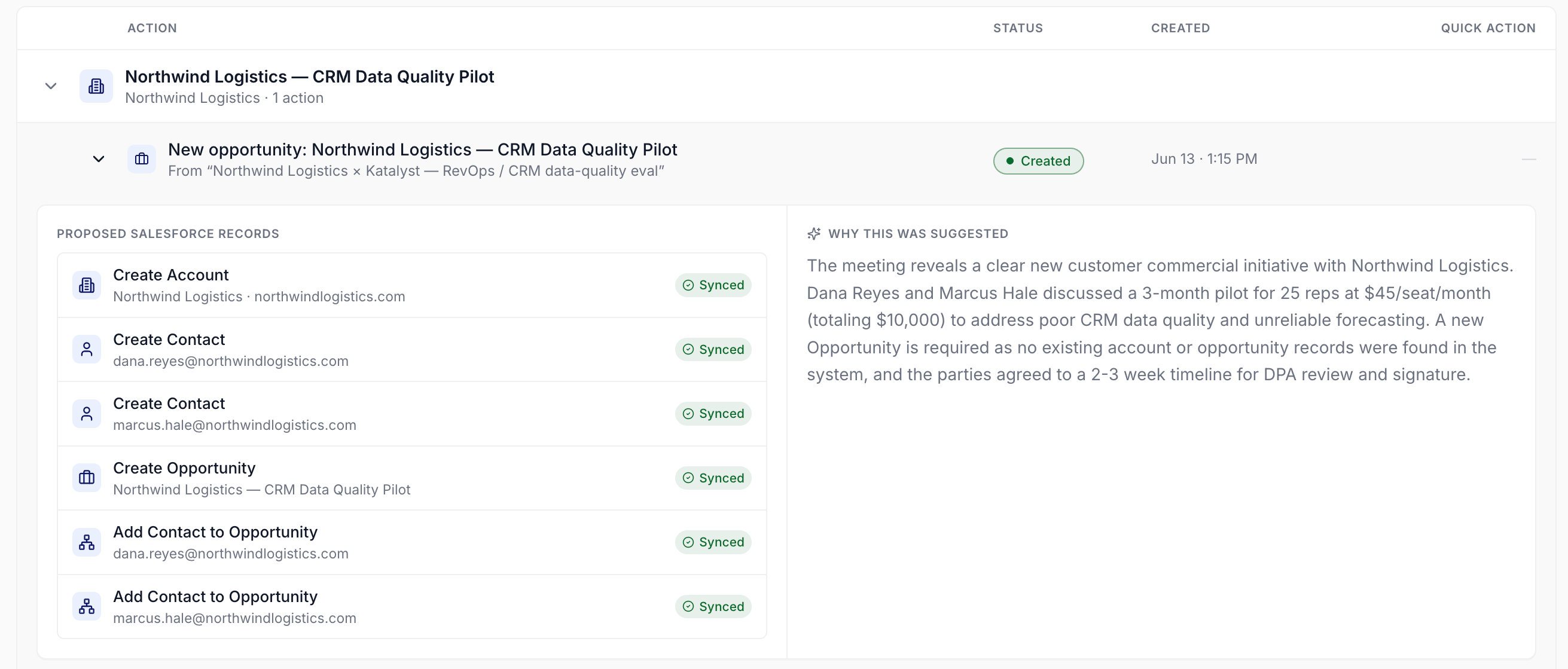 6. **Point coverage at it, if it's a deal you're actually working.** A newly created opportunity is a record; making it AI-active is what turns it into a deal Katalyst works on your behalf. If this one matters, add it to your coverage so suggestions, drafts, and per-deal chat start flowing against it.
## Patterns that work
**Approve on reasoning, not on plausibility.** The proposal will almost always look reasonable, because it was written by something that read the transcript. The question is not "is this a sensible deal" but "is this what actually happened on the call." You are the only person who can answer that, and it takes thirty seconds.
**Reject the exploratory ones without guilt.** Not every mention of a second business unit is a deal. Rejecting keeps the pipeline honest, and a rejected suggestion costs you nothing; the meeting record stays, and the conversation is still searchable.
**Do it the same day.** The value of this play collapses the moment you stop remembering the call clearly. A suggestion reviewed an hour after the meeting is a thirty-second check; the same one reviewed on Friday is a research task.
**Watch for locked rows.** If your org is at its plan's cap on AI-detected records from meetings, further ones appear locked rather than lost. A run of locked rows is the clearest upgrade argument you'll get, because each one is a real deal your team surfaced and couldn't act on.
## Related
* [Actions](../product/engage/actions) - the queue these suggestions land in, alongside field updates and drafted emails.
* [Meetings](../product/close-the-loop/meetings) - the notetaker and transcript layer that makes the detection possible.
* [Post-meeting Action Plan](../product/close-the-loop/post-meeting-action-plan) - the meeting-page view of the same post-call work.
* [AI-active coverage](../product/setup/ai-active-coverage) - where you make the new opportunity one the AI actually works on, and where the plan caps live.
* [Recap after a customer meeting](./recap-after-a-customer-meeting) - the wider post-call routine this play sits inside.
* [Knock out today's actions](./knock-out-todays-actions) - the daily queue-clearing routine where you'll meet these rows.
6. **Point coverage at it, if it's a deal you're actually working.** A newly created opportunity is a record; making it AI-active is what turns it into a deal Katalyst works on your behalf. If this one matters, add it to your coverage so suggestions, drafts, and per-deal chat start flowing against it.
## Patterns that work
**Approve on reasoning, not on plausibility.** The proposal will almost always look reasonable, because it was written by something that read the transcript. The question is not "is this a sensible deal" but "is this what actually happened on the call." You are the only person who can answer that, and it takes thirty seconds.
**Reject the exploratory ones without guilt.** Not every mention of a second business unit is a deal. Rejecting keeps the pipeline honest, and a rejected suggestion costs you nothing; the meeting record stays, and the conversation is still searchable.
**Do it the same day.** The value of this play collapses the moment you stop remembering the call clearly. A suggestion reviewed an hour after the meeting is a thirty-second check; the same one reviewed on Friday is a research task.
**Watch for locked rows.** If your org is at its plan's cap on AI-detected records from meetings, further ones appear locked rather than lost. A run of locked rows is the clearest upgrade argument you'll get, because each one is a real deal your team surfaced and couldn't act on.
## Related
* [Actions](../product/engage/actions) - the queue these suggestions land in, alongside field updates and drafted emails.
* [Meetings](../product/close-the-loop/meetings) - the notetaker and transcript layer that makes the detection possible.
* [Post-meeting Action Plan](../product/close-the-loop/post-meeting-action-plan) - the meeting-page view of the same post-call work.
* [AI-active coverage](../product/setup/ai-active-coverage) - where you make the new opportunity one the AI actually works on, and where the plan caps live.
* [Recap after a customer meeting](./recap-after-a-customer-meeting) - the wider post-call routine this play sits inside.
* [Knock out today's actions](./knock-out-todays-actions) - the daily queue-clearing routine where you'll meet these rows.