

Pipeline Hygiene
Pipeline Hygiene is the audit view. One score for the org, one row per rep, a Zero Board of deals scoring zero across the team, and a five-rule catalog that defines what “clean” means.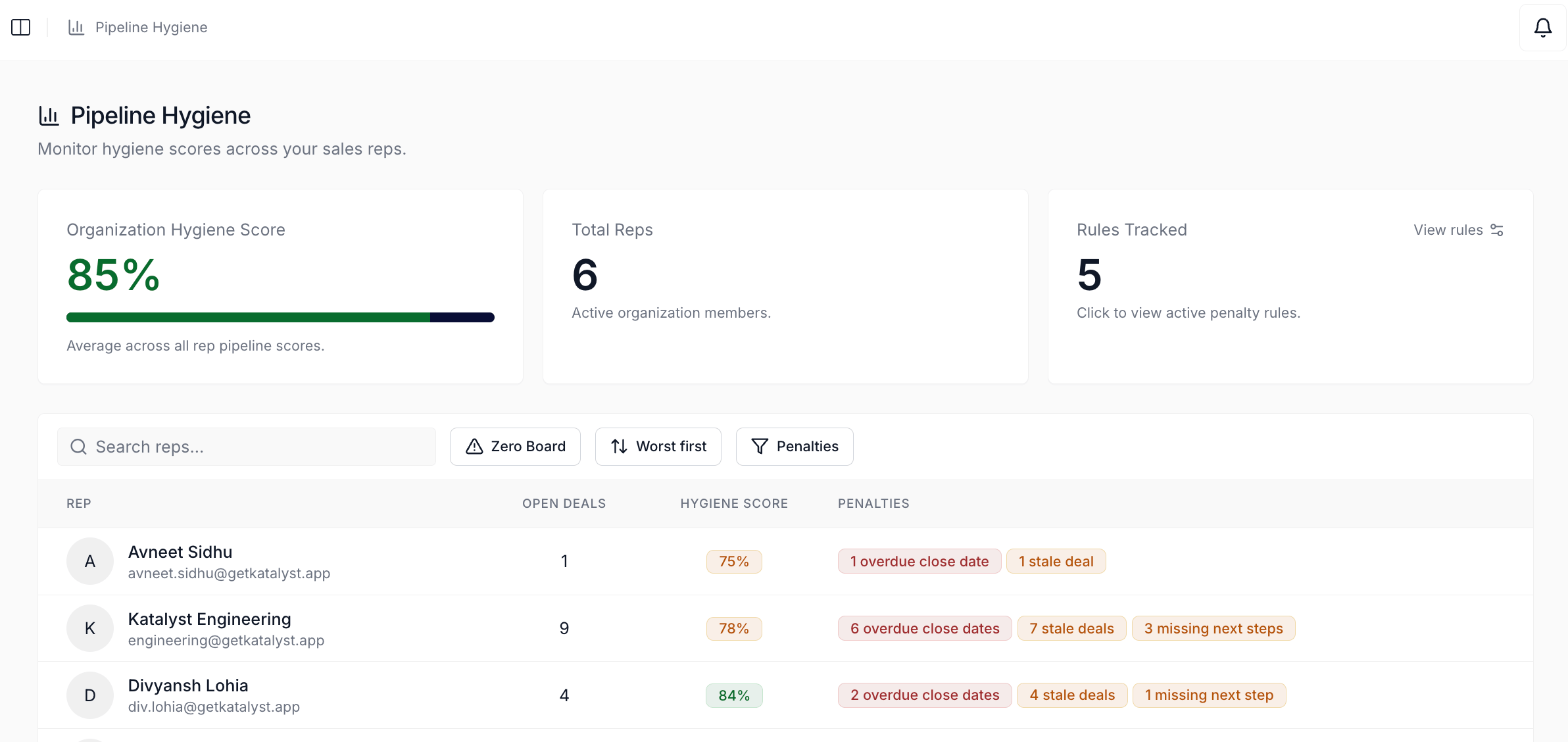
Pipeline Hygiene dashboard with the org KPI cards, the worst-first rep table, and the Zero Board toggle
What you can do here
- Read the org’s hygiene score at the top. The headline number is the average of every rep’s average across their open deals, colored green at 80 and up, amber at 50 to 79, red below 50. It’s the same number that shows up on the Home rail, computed from the same rule set, so the two surfaces never disagree.
- Scan every rep on one row. Each rep gets a row with their open-deal count, a hygiene score badge, and a chip cluster naming the violations behind the number (“3 overdue close dates”, “5 missing next steps”). Sort worst-first by default; flip to best-first when you want a leaderboard read.
- Drill into a rep for the 30-day trajectory. Clicking a row opens a per-rep page with a rolling 30-day score-history chart, the current score, and a worst-first table of every open deal they own, with a penalty chip cluster on each row.
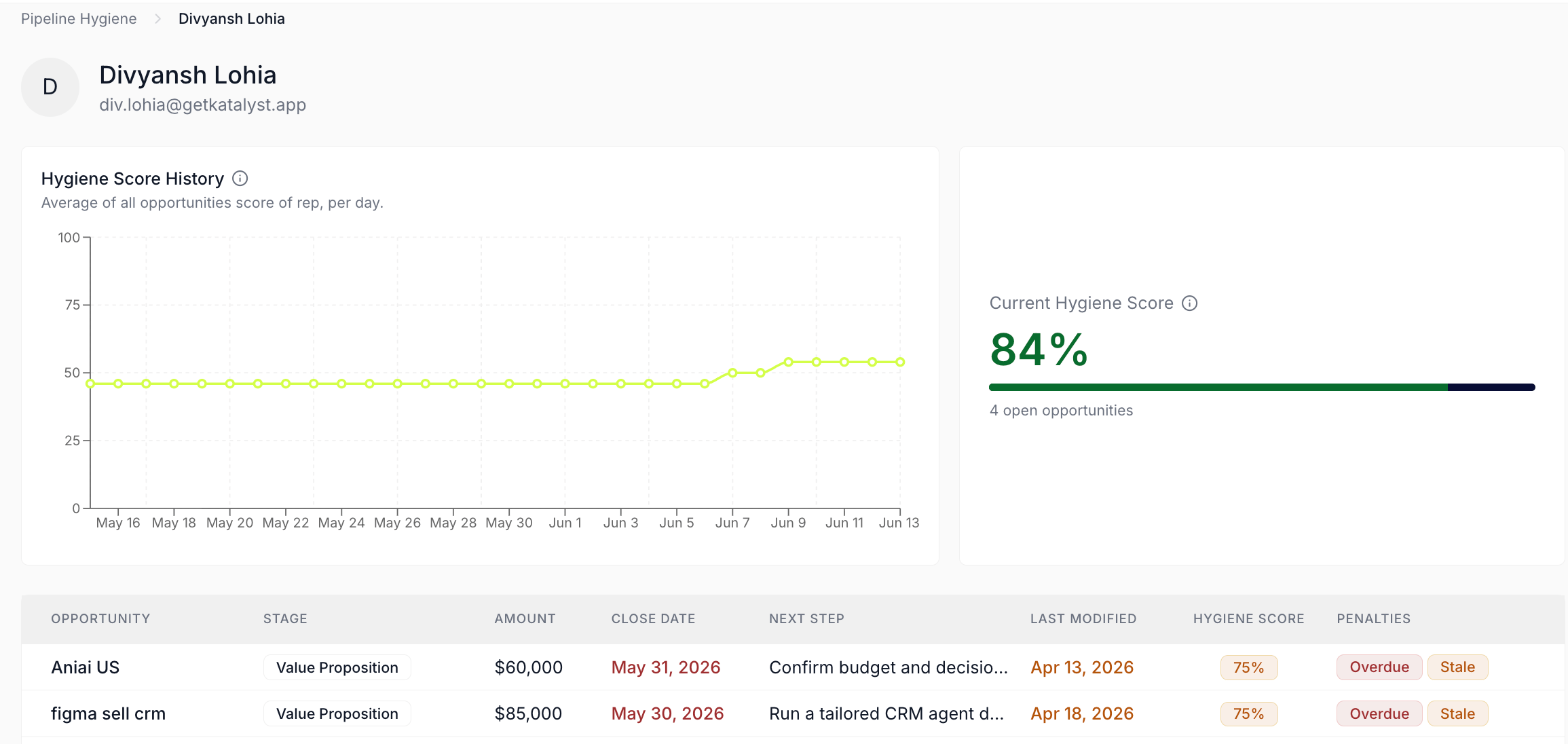
Per-rep hygiene drill-in with score history, current score, and per-deal table
- Triage the Zero Board. Toggle Zero Board in the toolbar to flip the table into a flat list of every open deal scoring exactly zero across the org, one row per opp, with the rep name in a column. Click any row to land on the deal page.
- Tune the rule catalog (managers and admins). Opening the Rules Tracked card surfaces the five-rule catalog with a penalty input and an on / off switch per rule. The page recomputes every score in the same frame as you edit, so you can see the impact before committing. Reps see the same dialog read-only.
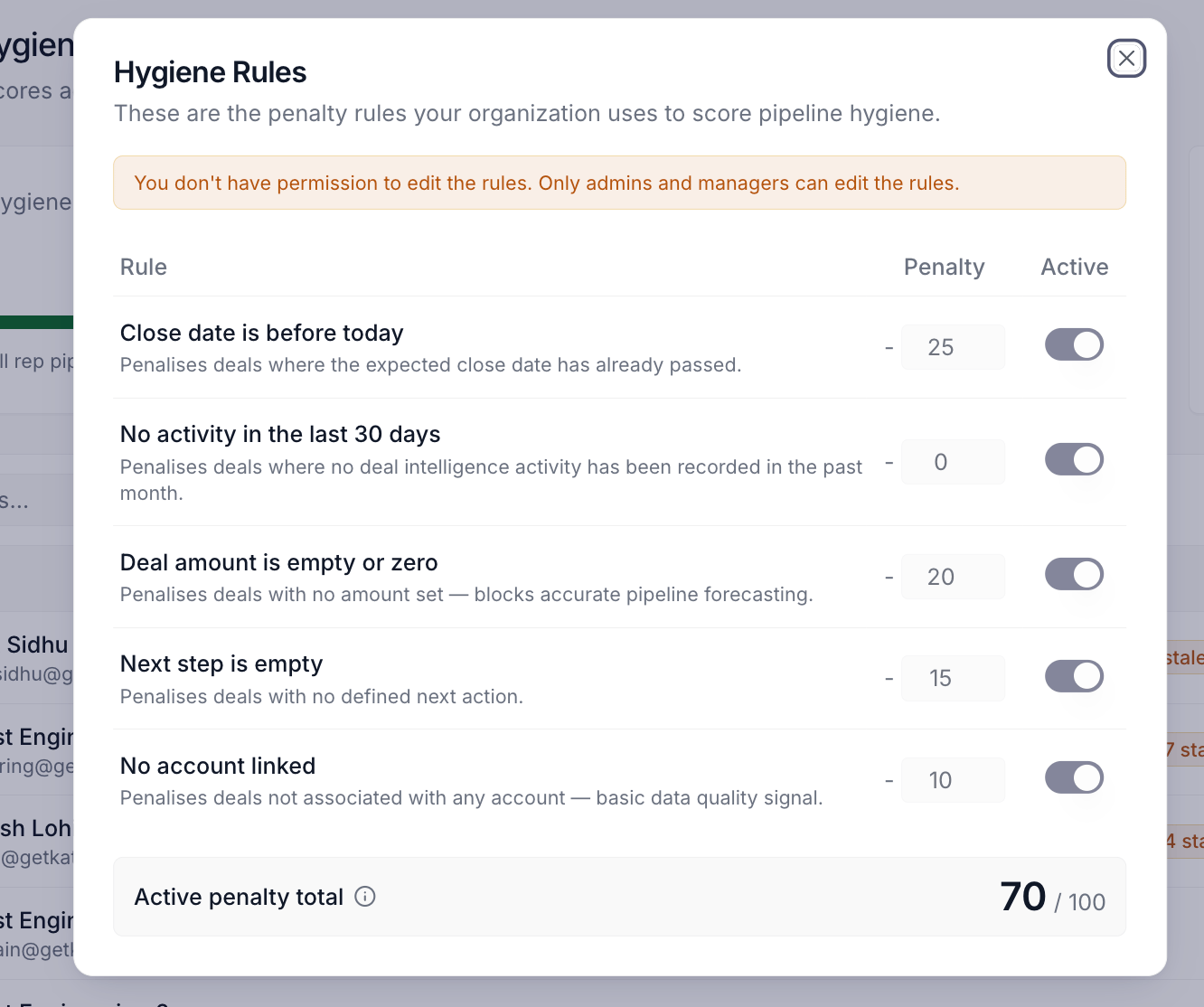
Hygiene Rules dialog with the five-rule catalog and the active-penalty-total chip
How to use it
A manager running a 30-rep team opens Pipeline Hygiene on a Friday afternoon. The org headline reads 68%, two reps sit in the red band, and the chip cluster on one of them shows nine stale-activity deals plus four missing next steps. She clicks that row, opens the per-rep page, and watches the 30-day chart tick down from 81 to 58 over the last three weeks, with a hover-revealed note that “Stale activity” became the dominant active rule eight days ago. The worst-first deal table at the bottom puts the five lowest-scoring deals at the top, all carrying “Stale” and “No next step” chips. She clicks the largest deal, lands on the opportunity page, drops a note in the chat panel asking for context, and adds the conversation to her one-on-one agenda. Ten minutes from “the team number is slipping” to a coaching plan scoped to four specific deals.Patterns that work
Use the Zero Board when the org score is the question. A worst-first rep table tells you who is slipping; the Zero Board tells you which deals are pulling the whole number down. Flip it on when the org score moves more than a few points week to week, fix the top five or ten rows, and the headline number usually follows. Read your own row the same way a manager reads everyone’s. Click into your own rep page when your Home rail hygiene number drops and you want to know why. The per-deal table at the bottom is sorted worst-first, so the deals doing the most damage are on top, and the penalty chips name the specific rule each one is failing. Tune rule weights for the way your team actually defines clean, not the defaults. The default weights (close date 30, stale activity 25, amount 20, next step 15, account 10) are a starting point. Teams that live and die on next-step discipline often push that weight to 25 or 30; teams running enterprise deals with naturally-long cycles often soften the stale-activity rule. The page enforces a 100-point ceiling on save, so you can’t accidentally make a deal score below zero. The hygiene score on Home is the same number, but the dashboard is where the why lives. The Home rail gives you the headline; this page gives you the violation chips, the per-rep trajectory, and the per-deal table. Treat Home as the daily glance and the dashboard as where you go when the glance demands a follow-up.Related
- Home - the rail card that surfaces the same hygiene score with a hover-revealed breakdown.
- Opportunities - the deal pages that every Pipeline Hygiene row clicks through to.
- Team & permissions - the canonical home for the role gating on Hygiene Rules editing (managers and admins write; reps read).
- Monday morning pipeline review - the manager loop that opens here and ends with one-on-one talking points.
- Pre-board meeting forecast prep - sweeping the Zero Board before a forecast call.
- Build your daily focus list - pairing your own hygiene score with the Home Do This Now rail.