

Home
Home is where you start your day. One global chat across your whole pipeline, a rail of pipeline vitals, and a prioritized list of what to act on next, all on one screen. Ask a question and Katalyst does not just answer it: it renders the deal as a panel you can read at a glance, names the single most important next move, and puts that move one click away.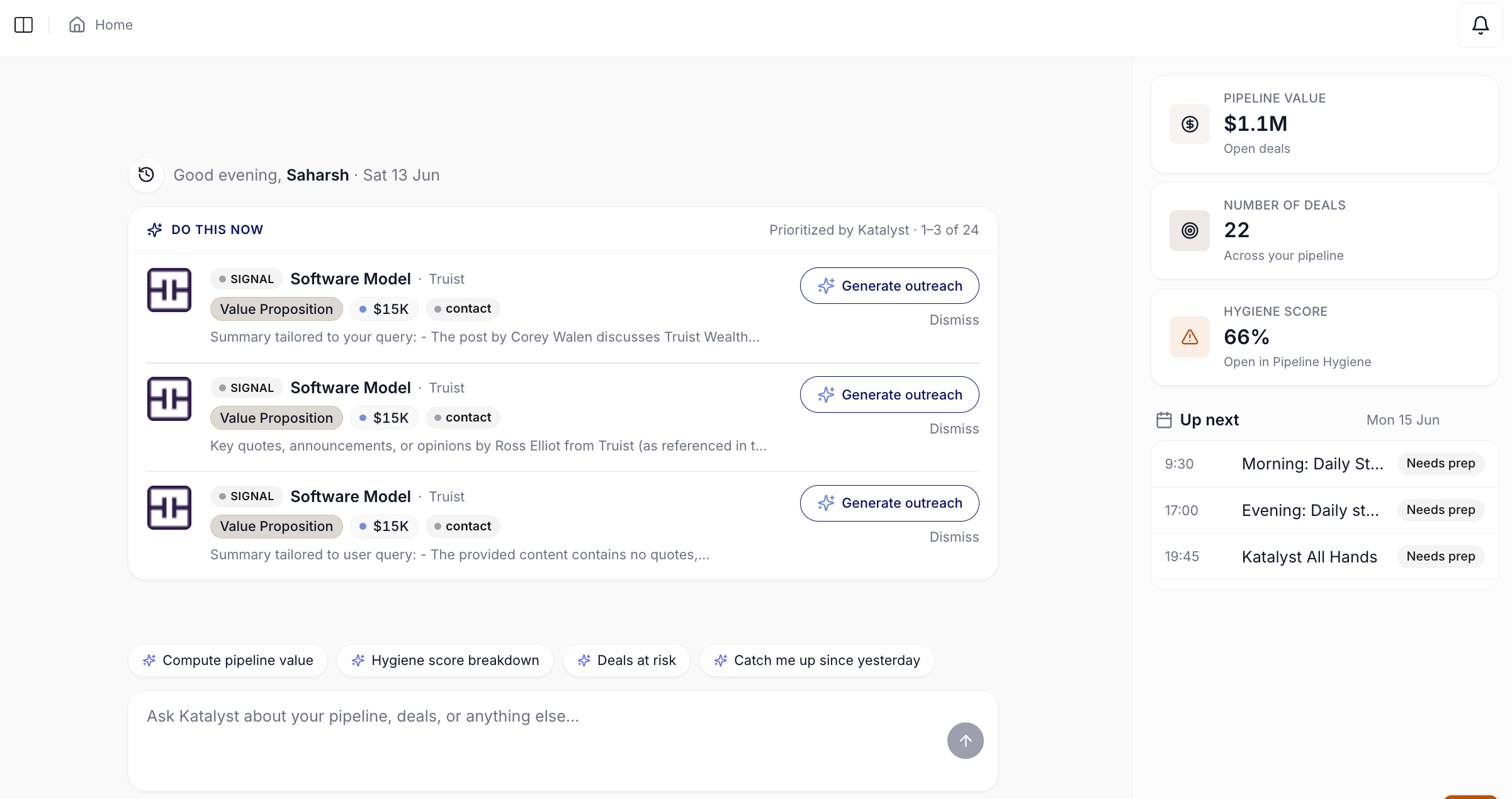
Home tab landing view with the time-of-day greeting, Do This Now card, suggested prompts, composer, and the right-rail insight cards
What you can do here
- Ask Katalyst anything across your entire book. The Home chat reasons over every opportunity, account, contact, signal, and meeting at once. It can also take Salesforce writes for you when you ask, so the question and the action live in the same place. A reasoning trace (“Thought for 53s”) sits above each answer if you want to see what it pulled.
- Get coached, not just answered. Ask about a specific deal and the chat leads with the highest-priority action grounded in established sales methodology (MEDDPICC, Challenger, JOLT and others) rather than restating the data you already have. Where an account plan exists, its highlights, the top challenge, the recommended pitch angle, and the expected business impact, fold into the deal snapshot alongside the answer.
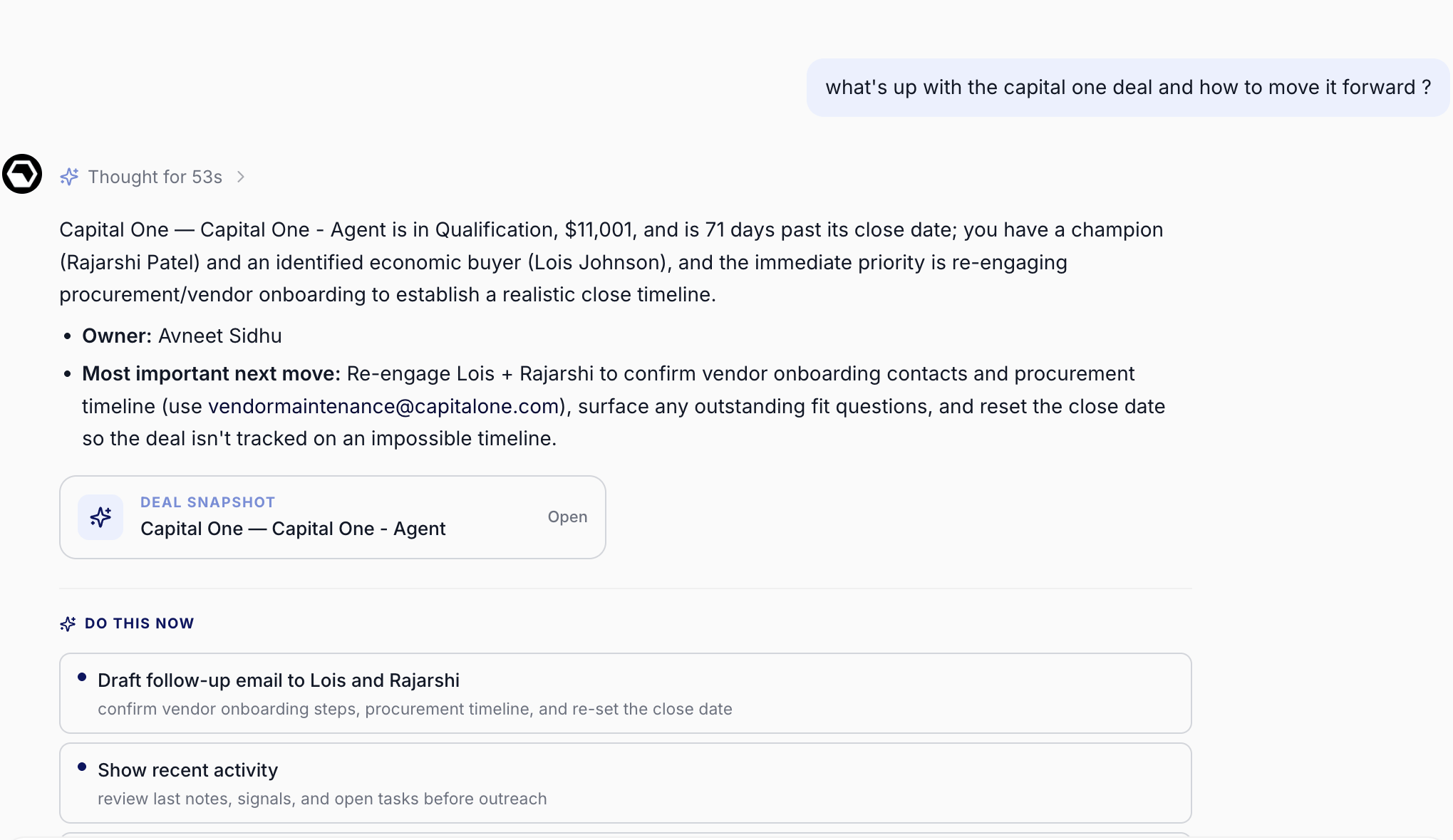
The chat leading with the most important next move, with a deal snapshot and one-click next steps beneath it
- Read your pipeline as panels, not paragraphs. Ask a pipeline-wide question and the answer can render in the right panel as a ranked, scrollable list of deal cards. Each carries the account, stage, amount, and a color-coded flag (overdue, stale, closing soon) so risk is visible without reading a word of prose. Click any card to open the full deal snapshot: stage, amount, close date, champion and economic buyer, blockers, action items, AI recommendations, and recent signals. A back control returns you to the list, and closing the panel restores whatever was there before.
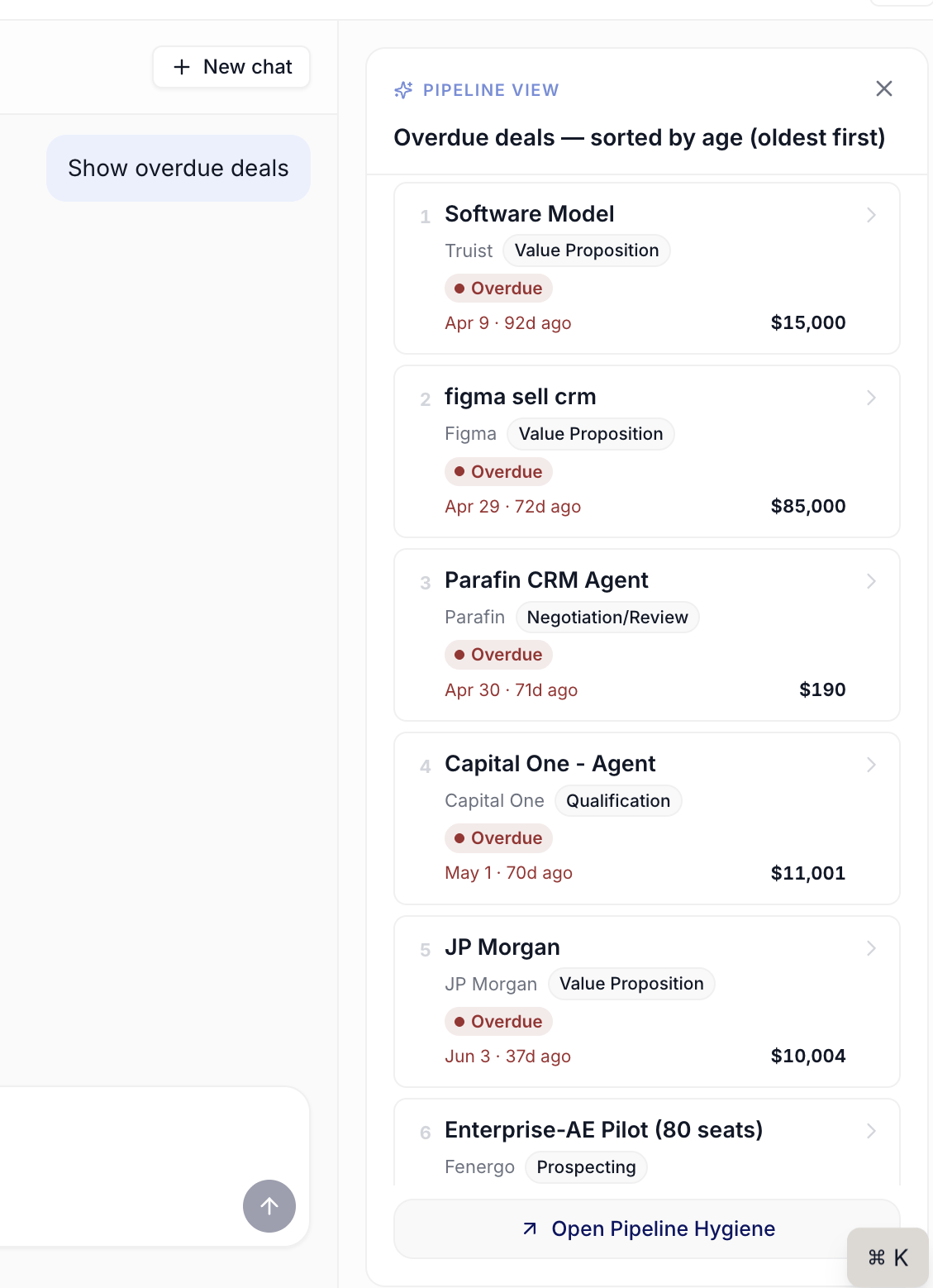
The chat right panel rendering the pipeline as a ranked list of deal cards with risk flags
- Take the next step in one click. Every answer can carry a row of “Do this now” buttons beneath it, offering the recommended follow-ups (draft the email, log the task, open the deal) with a short line on why each one matters right now. You act on the answer without composing a second request.
- Answer a clarifying question instead of re-typing. When Katalyst is not sure which record you mean, it surfaces a clarification panel above the composer with the candidates as labeled choices, plus an “Other” field for a custom answer. Two same-named deals no longer mean a wrong guess and a re-ask.
- Scan structured answers. Informational replies (top deals, accounts at risk, pipeline summaries) render as structured cards with ranked lists, a key-metrics block, and color-coded insight bullets, so a long answer is something you skim rather than read.
- Start from a suggested prompt. Four starter chips (“Compute pipeline value”, “Hygiene score breakdown”, “Deals at risk”, “Catch me up since yesterday”) seed the composer when you don’t want to write the question yourself.
- Work the Do This Now rail. Katalyst surfaces the things across your book most worth a move right now: top buying signals, hygiene rules pulling deals down, leadership changes at key accounts. Each row names the recommended move on a second line and carries a Take action button that opens the chat already holding that context.
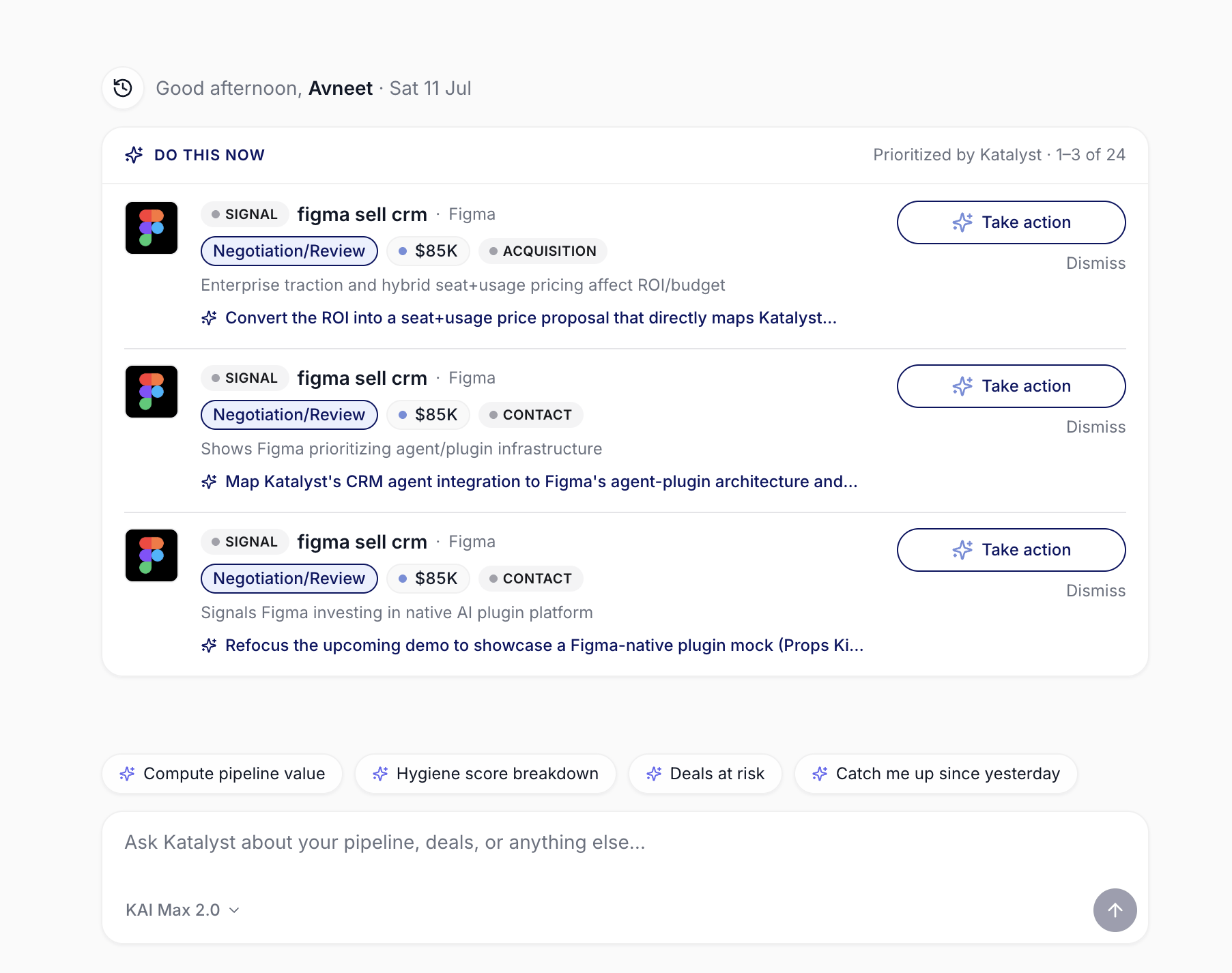
The Do This Now rail, with the recommended move under each signal and Take action beside it
- Glance at your pipeline vitals. The right rail shows your total pipeline value, open deal count, and team-wide hygiene score, with hover-revealed breakdowns under each number.
- See what’s next on the calendar. Today’s meetings and the next day or two sit in the rail with a Ready / Needs prep label, so you can peek the brief before deciding what to open first.
- Know where you stand on chat usage. The composer shows your active AI plan and a running count of the conversations and messages you have left this cycle. Your plan sets a monthly conversation cap and a per-conversation message cap, and that budget is shared across every chat surface in Katalyst, so a chat started on a deal page draws from the same pool as one started here. Reach a cap and a banner names which one it was and offers the upgrade, rather than failing with a generic error.
How to use it
A rep covering 60 mid-market healthcare accounts signs in on a Monday at 8:42 AM. Do This Now flags a closing-risk signal on her largest Negotiation deal, and the row already tells her the move to make, so she hits Take action and the chat opens holding the signal. The rail says she’s at $4.2M open across 38 deals with a team hygiene score of 71. She types “catch me up on what changed across my pipeline since Friday” and gets a structured card: three new signals, two pending AI Suggestions, a stage-by-stage diff. Then she asks “show me my overdue deals”, and instead of a wall of text the right panel returns a ranked stack of cards, five flagged red. She clicks the oldest, reads the snapshot, and asks what to do about it; the chat names one move, re-engage the economic buyer to reset an impossible close date, and offers a “Draft follow-up email” button underneath. One click and the draft is open. Eleven minutes from sign-in to a Monday plan she has already started executing.Patterns that work
Two things are called “Do this now”, and they are not the same. The Do This Now rail on the landing view is Katalyst’s unprompted read of what matters across your whole book, drawn from signals and hygiene. The Do This Now buttons under a chat answer are the follow-ups to the specific question you just asked. The rail starts your day; the buttons finish your thought. Ask for the move, not the data. The chat’s coaching layer only engages when you ask it to reason about a deal. “What’s the status of the Capital One deal” gets you a summary; “what’s up with the Capital One deal and how do I move it forward” gets you a summary and the single highest-priority action grounded in methodology. The second question costs you nothing extra and is almost always the one you actually meant. Let the panel do the reading. For anything list-shaped, at-risk deals, overdue deals, top deals by value, the right panel is faster than prose and the color-coded flags surface risk before you have parsed a single number. Reach for a panel question when you are scanning, and a prose question when you are deciding. Treat Do This Now as your first read, not a filter. It’s AI-driven, not configurable. The rail picks the highest-priority items every time you land, so the right read is “what did Katalyst put on top today” rather than “let me tune this view.” If you want a configurable equivalent, save a Saved View on the Opportunities tab or favorite the deals you want pinned in the sidebar. Use the Home chat for cross-pipeline questions, the per-record chats for one-deal questions. Home reasons across your whole book; a chat panel on a specific opportunity or account is scoped to that record. Both draw from the same monthly chat budget, so where you ask matters less for billing than it does for context. Spend conversations on big questions, messages on follow-ups. Because your plan caps conversations per month and messages per conversation, the cheapest habit is to keep one thread going on a topic rather than opening a new chat for every question. Come back to old threads from the history popover instead of starting fresh.Related
- Opportunities - the deal-list workspace the Home rail and the chat’s deal panels click through into.
- Pipeline Hygiene - the canonical source for the hygiene number in the Home rail and the overdue flags on deal cards.
- Actions - the review queue the Do This Now rail samples from.
- Signals - the buying-signal feed behind Do This Now, and the home of the recommended-move logic the rail surfaces.
- Draft Email - where a “Draft follow-up email” button from a chat answer lands you.
- Account detail - the account plan whose highlights fold into the deal snapshot.
- Plans and Billing - where your monthly conversation and message allowance is set, and where to raise it.
- Build your daily focus list - using Home as the first 10 minutes of your day.
- Catch up after PTO - pointing the Home chat at the week you missed.
- Start the day with Signals - the daily Signals-scan ritual that pairs with the Home glance.
- Knock out today’s actions in 15 minutes - the action play that starts where Do This Now leaves off.
- Monday morning pipeline review - the manager version of the Home loop, paired with Pipeline Hygiene.