

Weekly close-the-loop review
Friday afternoon. The week is closing; the calendar is light; the manager has 20 minutes before signing off. This is the moment to look across the team and confirm follow-through: whose hygiene drifted this week, where the AI did the right thing versus where it dropped, which accounts look under-handled, and what’s worth raising in Monday’s one-on-ones. This play turns Pipeline Hygiene into the launchpad for that review: walk the team worst-first, drill per-rep into AI Activity, cross-reference any under-handled account’s Activity History, and flag 2-3 talking points per rep with gaps. About 20 minutes for a 10-rep team.What to expect
- Timing. Roughly 20 minutes for a 10-rep team; longer if the team is bigger or if a couple of reps drifted hard this week.
- Prerequisite. A team using Katalyst across their pipeline, with a week’s worth of activity behind them: accepted recommendations from meetings, fired field updates, hygiene scores tracked. The manager has the org:admin or org:manager Clerk role so the Pipeline Hygiene dashboard reads team-wide.
- Outcome. A flagged list of 2-3 reps with gaps, each with named talking points for the Monday one-on-one, plus a sense of team-wide AI trust trends going into the new week.
Step-by-step
- Open Pipeline Hygiene worst-first. Land on Pipeline Hygiene from the side nav. The page reads top-down: three KPI cards (Organization Hygiene Score, Total Reps, Rules Tracked), the toolbar, and the rep-by-rep table sorted worst-first by default. The headline number tells the team-wide read at a glance; the per-rep table shows the shape of the slip. Scan the table top-to-bottom: read the score badge color, the open-deal count, and the violation chip cluster on each row (the “3 overdue close dates”, “5 missing next steps”, “2 stale deals” summaries are the diagnostic).
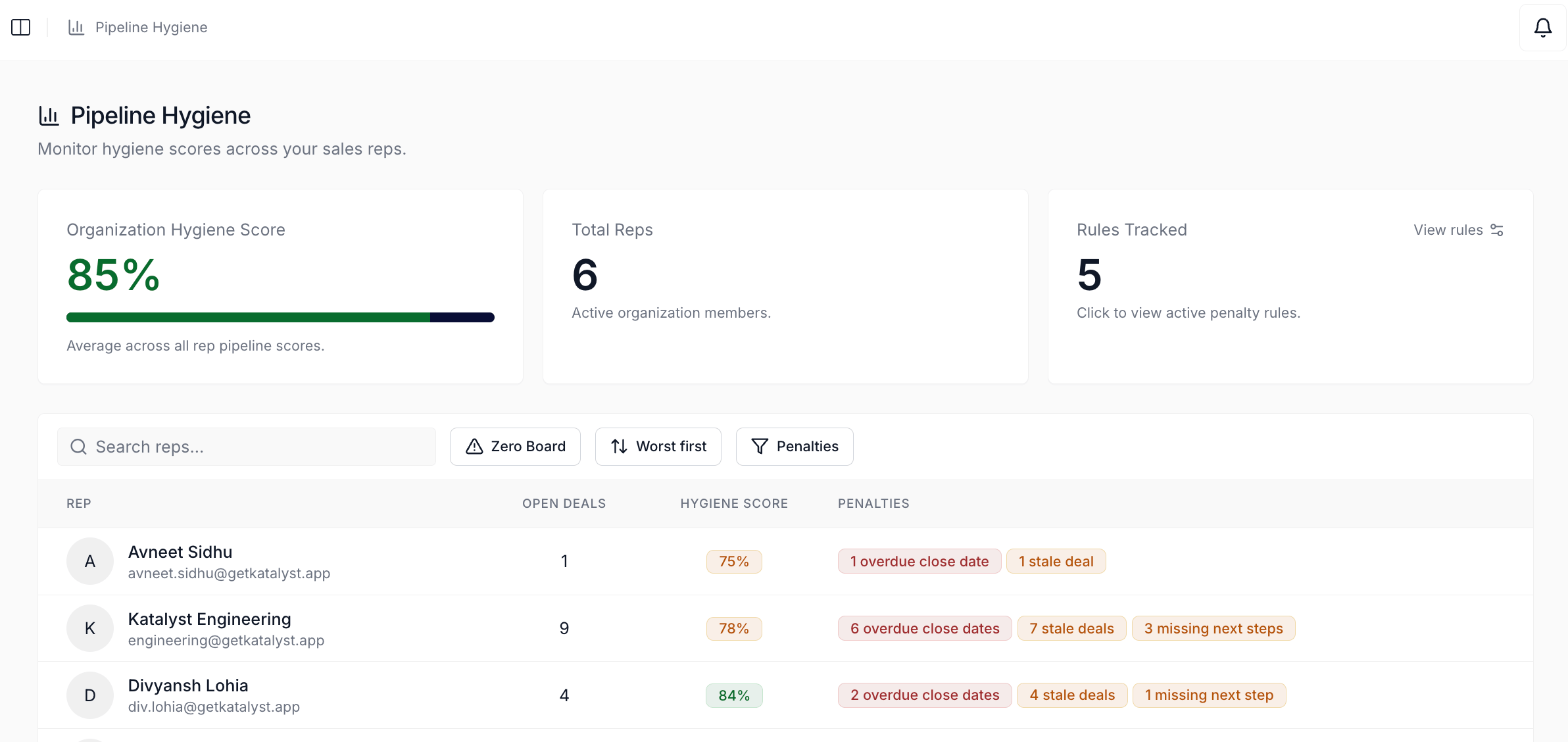
Pipeline Hygiene dashboard sorted worst-first; the per-rep table reads with the score badge, open-deal count, and the violation chip cluster on each row.
- Pick the 2-3 at-risk reps. Two or three reps whose score dropped below the team average (or whose violation chip cluster looks heavier than usual) are usually the worth-reviewing list. The Zero Board toggle on the toolbar is a useful sanity check: flip it on and scan the flat list of every open opp scoring 0 across the team, with the rep name as a column. A rep who shows up three or four times on the Zero Board is the rep to start with on Monday.
- Open the per-rep page for the first at-risk rep. Click the rep’s row. The per-rep page loads with breadcrumb, the 30-day hygiene score history chart, the current score card, and the per-opp table sorted worst-first. The history chart shows whether the drift is a one-week dip or a five-week slide. The per-opp table names exactly which deals are dragging the score down.
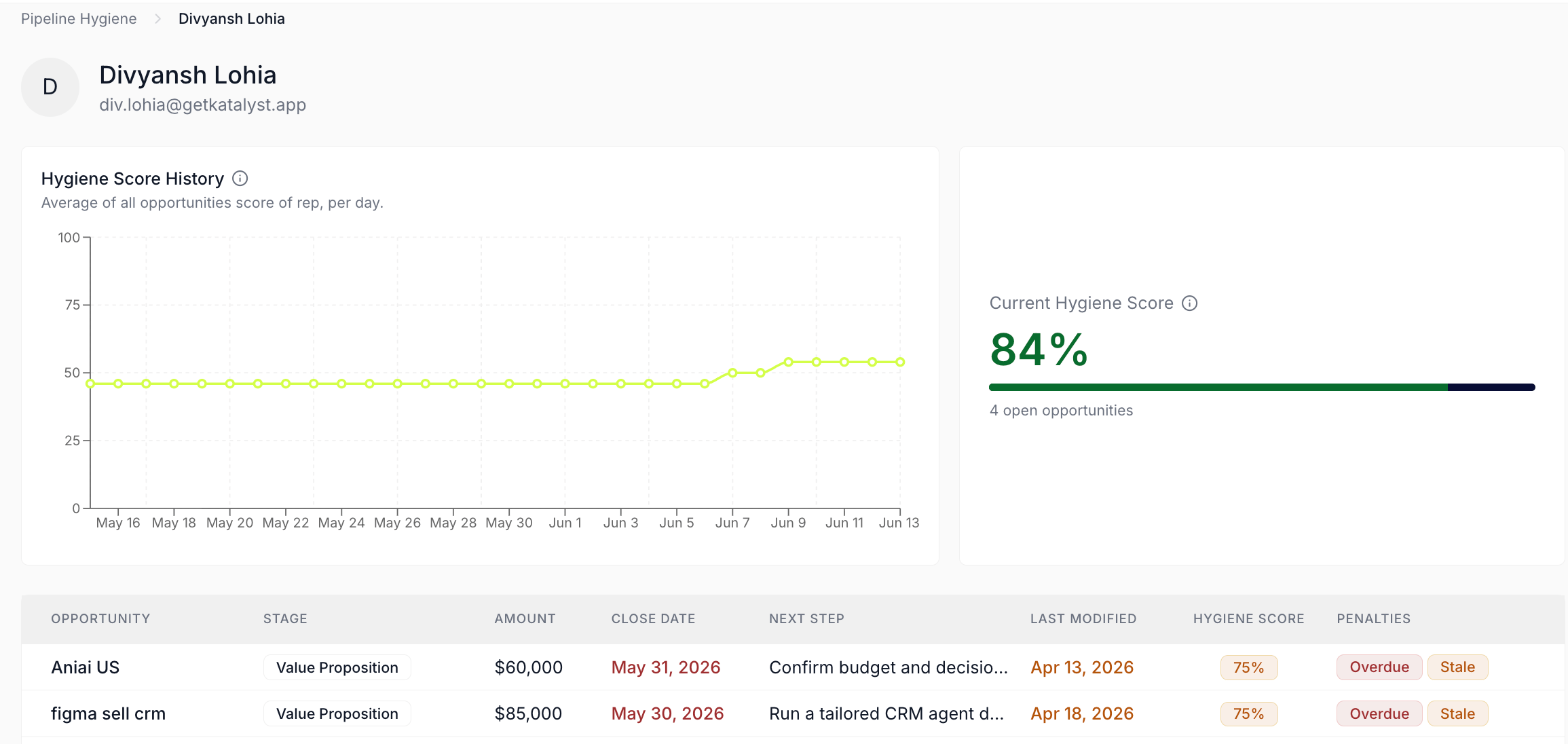
Per-rep Pipeline Hygiene page; the history chart, current score, and worst-first per-opp table together name where the slip is.
- Cross-reference with AI Activity scoped to that rep. Open the AI Activity tab from the side nav (the Sparkles icon labeled AI Recommendations Activity). Flip the scope to All Opportunities so every rep’s records come into view; use the Account or Opportunity column to scan visually for the at-risk rep’s accounts (the page has no per-rep filter today). Set the date range to the last 7 days. Read the rows: where did the AI propose updates the rep accepted, where did it propose updates the rep rejected, where did the AI go quiet on accounts that look like they needed nudging. The pattern is what to coach to.
A dedicated screenshot of the AI Activity tab is pending. When it lands, it should anchor this step (the page shell with the Total Activities KPI card, the four filters, and the Recent Activity table) and the cross-reference flow in step 5.
- For any specific account that looks under-handled, open its Activity History. From the AI Activity table, click into the linked account name for a row that stood out (a deal that’s been pending for too long, a Stage that should have moved but didn’t, an account with no AI activity at all on a week where it should have had some). The account opens; click into the Activity History sub-tab for the per-account version of the same data. The granular view names exactly which writes happened and which didn’t on that one deal.
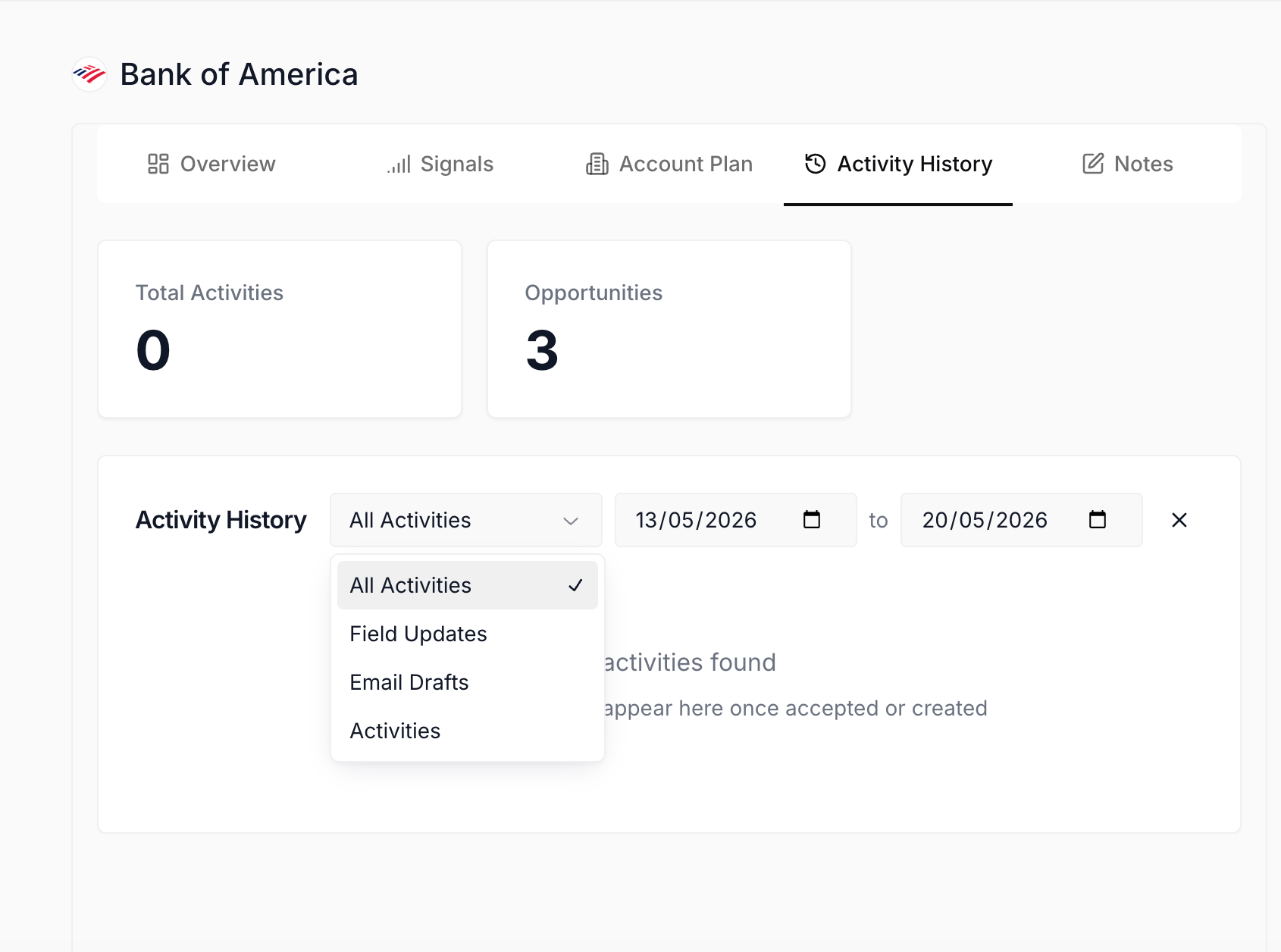
Activity History sub-tab on the under-handled account; the per-account view names exactly what the AI did and didn't do on the deal.
- Flag 2-3 talking points for the Monday one-on-one. Two or three observations per at-risk rep is the right depth. The shape: “Three deals in Negotiation with stale Next Step; let’s walk why those didn’t update this week.” “AI proposed Stage moves on five accounts and you rejected all of them; let’s talk about whether the column instruction is off.” “Zero Board has the [account name] deal on it three weeks running; let’s plan the re-engagement.” Write the talking points down in whatever the manager uses for one-on-one prep; the Pipeline Hygiene and AI Activity reads are the evidence.
- Repeat for the rest of the at-risk reps. Move through the 2-3 reps from step 2, same pass: per-rep page, AI Activity scoped to the rep, drill into one or two under-handled accounts, name the talking points. A 10-rep team with 2-3 at-risk reps is usually 15 minutes by here.
- Optionally adjust hygiene rule weights if a systemic gap shows up. If the same violation is dragging multiple reps (every rep is showing 5+ “missing next steps” because the team agreed to a new Next Step convention that hasn’t been adopted), open the Hygiene Rules dialog from the third KPI card on the dashboard and consider tuning the rule’s penalty weight or temporarily muting it. The change updates every score on the page in the same frame; the persistence is debounced and saves silently. End the review by closing the tab. Monday’s one-on-ones go in pre-loaded.
Variations
If the team is small (3-5 reps), the worst-first scan is overkill; just open every rep’s per-rep page in turn and run the AI Activity cross-reference on each. The whole review is 10 minutes for a tight team. If the manager is doing a monthly review rather than a weekly one, widen the AI Activity date range to 30 days and treat the review as a 45-minute deeper coaching pass rather than a 20-minute Friday ritual; the talking-point shape is the same, just with more drill-ins and a sense of trend rather than week-over-week shape. If a specific rep is in their first quarter (Katalyst is new to them), the AI Activity scan should weight reads to accepts versus rejects more carefully; high rejection rates from a new rep are usually a trust-and-calibration conversation, not a coaching one.Related
- Pipeline Hygiene - the manager dashboard this play launches from.
- AI Activity - the org-wide forensic log the review cross-references.
- Activity History - the per-account drill-in this play ends at.
- Audit AI activity this week - the AE-side cousin to this manager ritual; the rep audits their own AI on the same Friday cadence.
- Monday morning pipeline review - the Monday one-on-one preparation play this review feeds into.
- Confirm Salesforce sync end of day - the daily rep ritual whose weekly accumulation this review reads against.