

Choose which deals get AI
Coverage decides where Katalyst spends its attention. Every suggestion, draft, insight, and per-deal chat flows from which opportunities are AI-active, which makes this the highest-leverage setting in the product and the one teams most reliably get wrong, usually by turning everything on and then wondering why nobody works the queue. This play is the fifteen minutes it takes to point it properly, and the quarterly habit that keeps it pointed.What to expect
- Timing. 10 to 15 minutes for the first pass, 5 minutes a quarter after that.
- Prerequisite. Admin access, a synced Salesforce pipeline, and a plan with some platform coverage on it.
- Outcome. A deliberately chosen set of AI-active opportunities, the accounts and buying committees behind them covered for free, and a clear read on whether your current tier is actually the constraint.
Step-by-step
- Open AI-active coverage in Settings. The three cards at the top are the whole story: the opportunities you have chosen against your platform coverage, and the linked accounts and linked contacts that came along automatically.
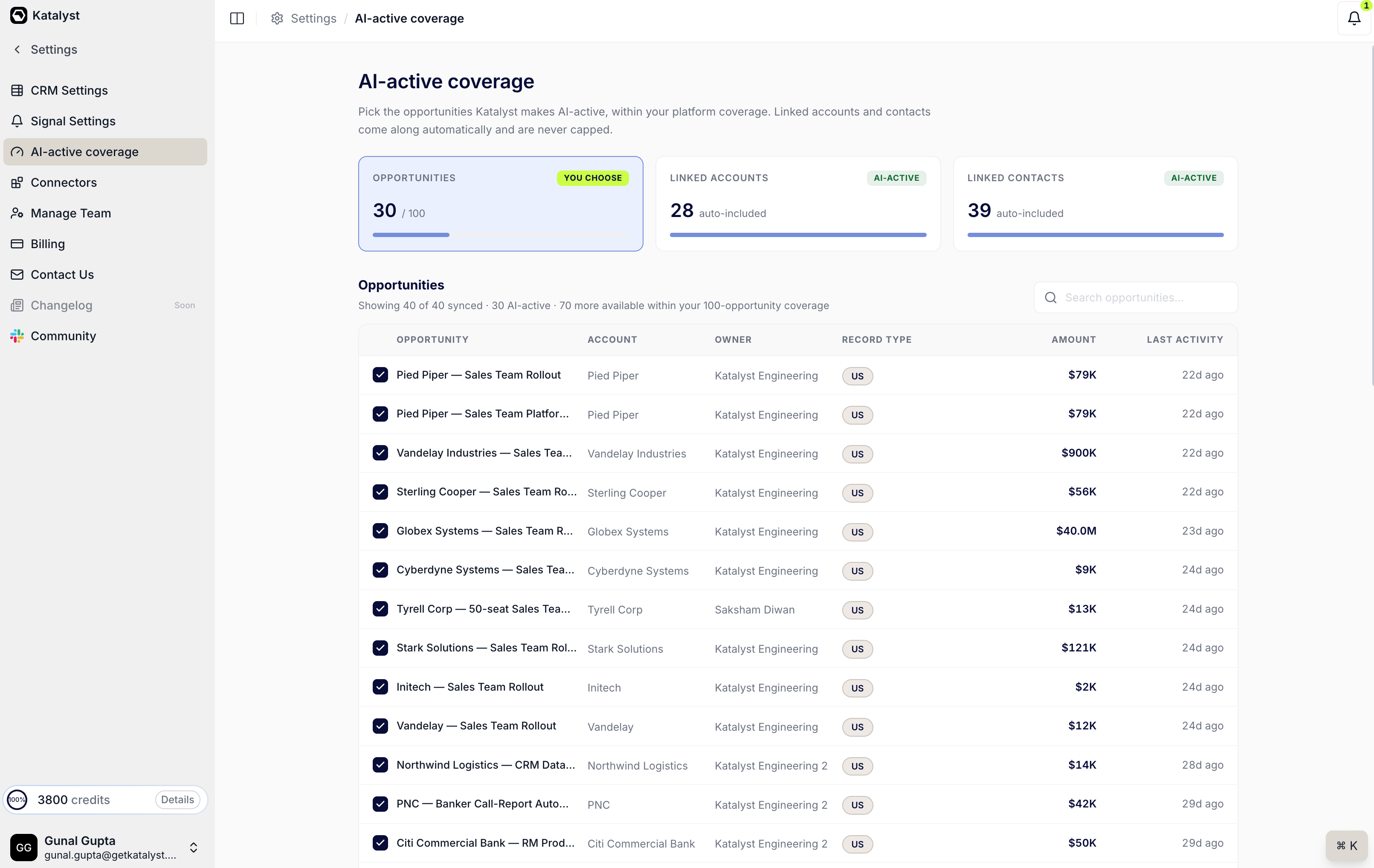
The coverage page: you choose opportunities, and the surrounding accounts and contacts are included at no cost.
- Understand what you are actually buying. You are choosing deals, not records. Making an opportunity AI-active pulls in its account and its contacts at no extra cost, and they never count against the cap. Any instinct to economise by leaving contacts out is both impossible and counterproductive: the surrounding context is what makes the suggestions good.
- Sort by what matters, not by what’s loudest. The table carries account, owner, record type, amount, and last activity. Amount is the obvious sort; last activity is often the better one, because a large deal nobody has touched in six weeks is a worse use of coverage than a mid-size deal in active negotiation.
- Check the deals you are genuinely selling this quarter. Not the whole book. Not everything that is technically open. The deals a rep would name if you asked them what they are working. The counter moves as you go, and the linked-accounts and linked-contacts cards fill in behind it so you can see what each choice bought you.
- Leave headroom. Do not spend your last slots on marginal deals. New opportunities arrive, including ones Katalyst itself detects from meetings, and you want room to cover them without a reshuffle.
- Watch for locked rows over the next few weeks. When the org is at its cap, further AI-detected records from meetings appear locked rather than disappearing, on the meeting page and in the Actions queue. These are not a nuisance; they are the clearest evidence you will get about whether the next tier is worth buying, because each one is a real deal your team surfaced and could not act on.
- Come back at the quarter boundary. Uncheck what closed. Check what is now live. Five minutes, and the AI stays pointed at the pipeline you are actually selling rather than the one you were selling in March.
Patterns that work
Narrow beats broad, every time. A focused set of covered deals produces a queue the team reviews. A fully-covered book produces a queue nobody opens, and an unreviewed queue is worse than no queue, because it teaches the team that Katalyst’s suggestions are ignorable. Let the locked rows make the upgrade argument for you. “We should upgrade because AI is important” loses budget conversations. “We surfaced eleven real deals from meetings last quarter that we could not act on, and here they are” wins them. The locked rows are that list, already compiled. Coverage is an admin decision with rep consequences. The reps whose deals are not covered will notice, because their chat is unavailable and their suggestions never come. Tell them which deals are covered and why, rather than letting them discover it as a bug. Revisit after any big pipeline shift. A reorg, a new territory, a large deal landing: any of these can make yesterday’s coverage wrong. The five-minute pass is cheap; a quarter of AI pointed at closed deals is not.Related
- AI-active coverage - the surface this play runs on.
- Plans and Billing - where the coverage number itself is bought.
- Opportunities - the deals you are choosing between.
- Actions - the queue your covered deals feed, and where locked rows appear.
- Turn a meeting into a deal - the play that produces new opportunities wanting coverage.
- Manage your plan and credits - the billing side of the same decision.