

AI-active coverage
Coverage is the answer to “where do I point the AI?” You buy a number of AI-active opportunities as part of your plan; this page is where you decide which specific deals those slots are spent on. Everything downstream, suggestions, drafts, insights, per-deal chat, follows from that choice. The important part is what it costs you to be generous: linked accounts and contacts come along automatically and are never capped. You are choosing deals, not records.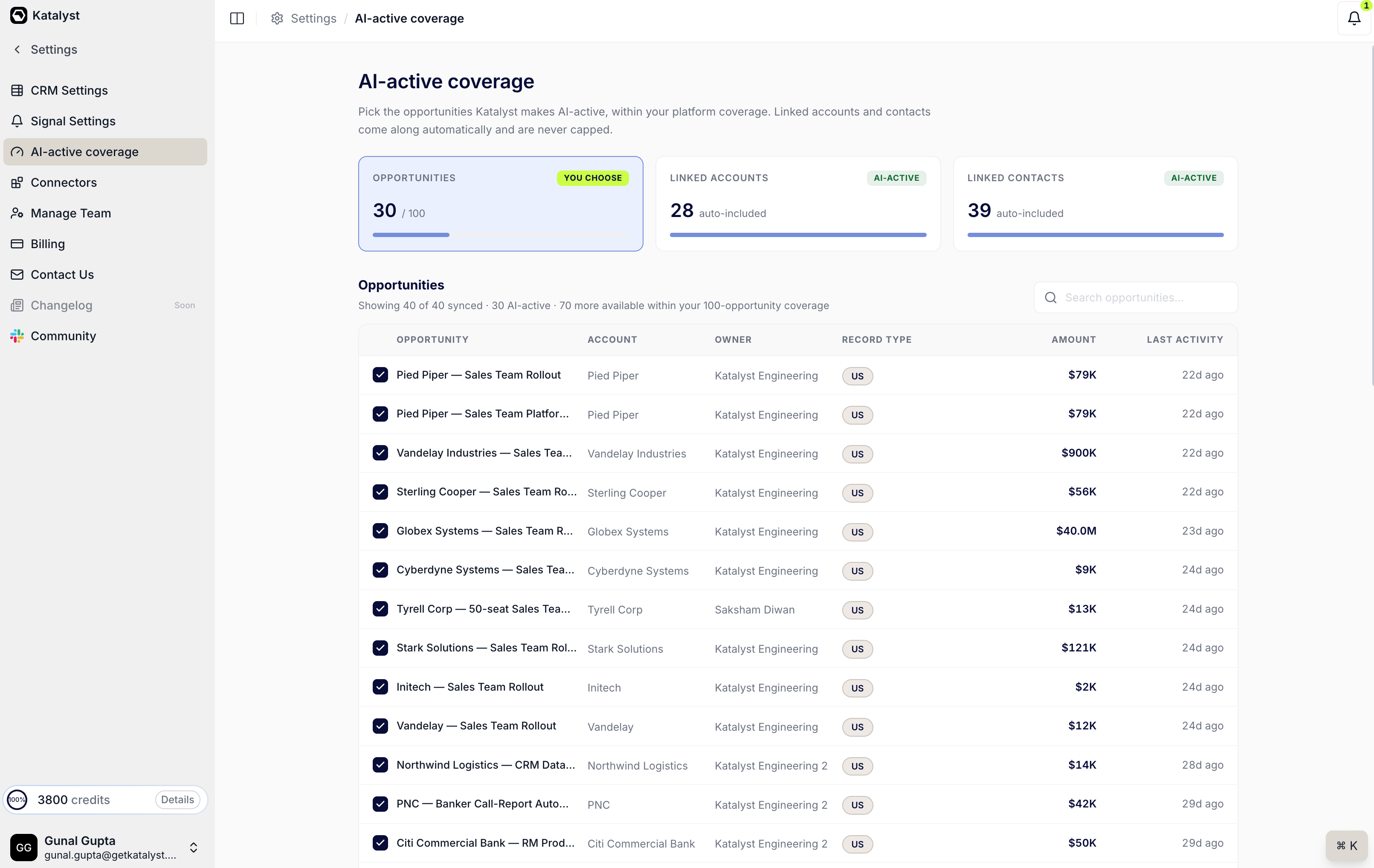
The AI-active coverage page: choose your opportunities, and linked accounts and contacts come along free
What you can do here
- Pick the opportunities the AI works on. A checkbox list of every synced opportunity, with account, owner, record type, amount, and last activity, so you can make the call on evidence rather than by name recognition. Search narrows the list when the book is long.
- Watch the counter. Three cards sit above the table: the opportunities you’ve chosen against your platform coverage, and the linked accounts and linked contacts that were auto-included as a result. The first is the number you’re spending; the other two are what you got for free.
- Get accounts and contacts for nothing. Making an opportunity AI-active automatically pulls in its linked account and contacts at no extra cost, and they never count against the cap. This is why the coverage decision is per-deal: the surrounding context comes with it.
- Understand what’s gated by plan. Coverage sets which deals the AI touches; your plan sets what it can do on them. Auto-created records from meetings are capped by tier (Starter surfaces up to 5, Core up to 20, Agent and Enterprise are unlimited). Signal types above your tier carry a lock badge. Premium capabilities like pre-meeting briefs and Slack delivery are Core and above.
- Hit a limit without losing anything. When an org reaches its cap on AI-detected records from meetings, the extra ones don’t vanish: they appear as a locked placeholder on the meeting page and as a locked row in the Actions queue, with an upgrade path attached. Upgrade and they unlock retroactively, so nothing that was detected while you were capped is lost.
How to use it
An admin on a Starter plan is piloting Katalyst across a small team and wants the AI focused rather than spread thin. She opens coverage, sorts by amount, and checks the ten opportunities that actually matter this quarter. The counter moves, and the linked-accounts and linked-contacts cards fill in behind it: ten deals bought her the surrounding companies and buying committees for free. A week later a meeting spins up an eleventh auto-detected deal. Rather than disappearing, it shows up locked with a clear upgrade prompt, so she can see exactly what the next tier would buy her and make the case with a number rather than a hunch. When she does upgrade, the record she was locked out of is waiting for her.Patterns that work
Choose deals, not records. Because linked accounts and contacts are free, the only question worth asking is “is this deal one I want Katalyst working?” Don’t try to economise by leaving contacts out; you can’t, and you shouldn’t want to. Start narrow and let the counter tell you when to grow. The instinct is to make everything AI-active on day one. Resist it. A focused set of deals produces suggestions the team actually reviews; a fully-covered book produces a queue nobody works. Raise coverage when you’re genuinely capped and the AI is earning its keep on what it already has. Read locked rows as evidence, not as an obstacle. A locked meeting-detected record is Katalyst telling you it found something you’re not paying to see. A handful of those over a month is the clearest upgrade signal you’ll get, and it’s specific enough to take to whoever holds the budget. Revisit coverage when the quarter turns. Deals close and priorities move, but coverage doesn’t reshuffle itself. A five-minute pass at the start of a quarter, uncheck what closed, check what’s now live, keeps the AI pointed at the pipeline you’re actually selling.Related
- Plans and Billing - where the coverage number itself is bought, alongside seats and credits.
- Opportunities - the deals you’re choosing between here.
- Actions - the queue where AI suggestions on your covered deals land, including locked rows when you’re at a cap.
- Meetings - where meeting-detected records are capped by plan and unlock retroactively.
- Signals Settings - the other plan-gated surface, where locked signal types carry the same upgrade path.