

Post-meeting Action Plan
The Post-meeting Action Plan is the marquee follow-through surface inside the meeting workspace. After a recorded call ends and the transcript is captured, Katalyst reads the conversation, decides whether the meeting introduced or moved a commercial initiative, and proposes the Salesforce write plan as a single Review and Sync, Approve and Sync, or Reject decision. The rep goes from meeting end to CRM-clean in under a minute instead of fifteen.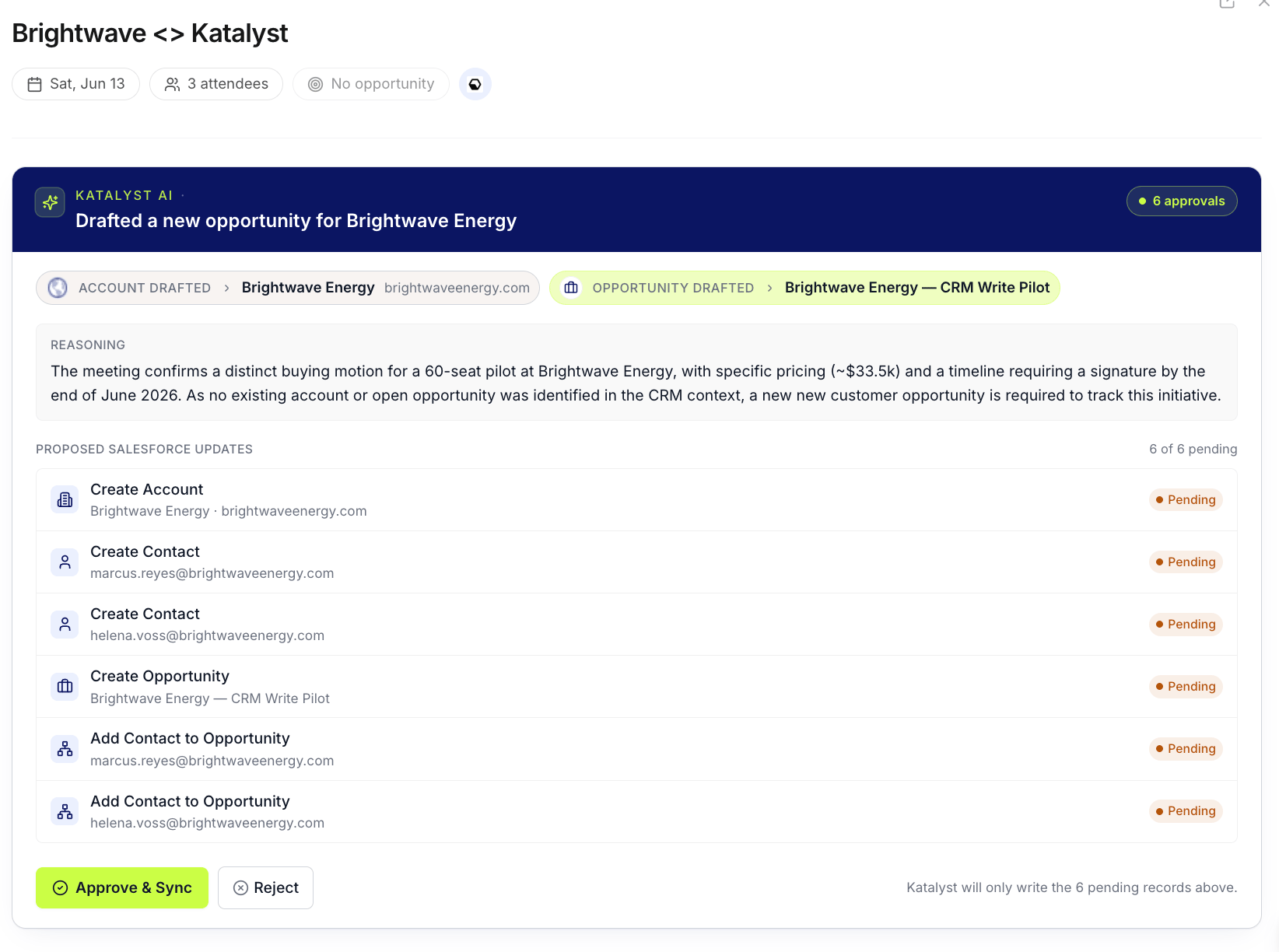
Post-meeting Action Plan card at the top of the meeting workspace: navy hero band with the dynamic headline, attribution chips for the detected account and opportunity, the reasoning block, and the approval queue.
What you can do here
- Land on the high-stakes decision first. The Action Plan renders inline at the top of the meeting workspace, above the post-meeting recommendations and above the summary, so the rep sees the proposal before scrolling. The navy hero band carries a dynamic headline that reflects what the engine concluded, “Drafted a new opportunity for Fenergo,” “Wrote this meeting into Acme Q3 expansion,” “Action required: Multiple opportunities detected for Globex.”
- Read the attribution chips and the reasoning. Below the hero, attribution chips show the detected or drafted account and the matched or drafted opportunity, each carrying the favicon or stage so the rep can confirm at a glance that the agent landed on the right entity. A reasoning block summarizes the evidence the engine used: the line in the transcript, the existing CRM context, the attendees who were or weren’t placed.
- Resolve the review surfaces inline when the engine isn’t sure. When the engine flags ambiguity, the card surfaces a single inline review panel rather than a multi-step dialog. Three review modes can appear, sometimes together: an opportunity-ambiguity picker when multiple existing deals could match (with an account picker for the rarer case where the account is also unclear), a held-contacts resolver for attendees the engine couldn’t confidently place (link to an existing contact, create a new one, or ignore), and a reconfirm pass when the engine’s own revalidator flagged a concern. The rep confirms once at the bottom of the panel rather than navigating between modals.
- Review the proposed Salesforce writes in the approval queue. When no review surfaces are open, the card lists the Salesforce-side writes the engine is proposing as a queue: create the account when it doesn’t exist, draft the opportunity, attach the attendees as contacts, link the meeting record, write the activity. The queue covers Salesforce writes only; internal Katalyst linking happens in the background.
- Approve and Sync, Review and Sync, or Reject. The action row at the bottom is the decision dispatcher. When the engine is confident, the card surfaces a volt-lime Approve and Sync alongside a Reject. When any review surface is present, the volt control becomes Review and Sync and the panel above takes over until the rep confirms. Rejecting collapses the card down to a single-band conclusion with an optional reason, so a re-open later doesn’t lie with a stale pending count.
- Watch the plan execute live. Approve flips the surface from a static queue into a live execution timeline. Each Salesforce write ticks in place as the executor lands it, with per-row state that reads draft, executing, succeeded, or failed; the rep can leave the page and come back, and the timeline catches up to whatever happened in the meantime. Failed rows surface a per-row Retry, and a top-level “Retry N failed steps” button surfaces when the plan ended with a partial.
- Follow the email draft into the canonical composer. When the plan includes a follow-up email step, accepting hands off to the Draft Email modal; the draft saves to Gmail or Outlook via the rep’s connected provider rather than sending automatically. The rep edits, reviews, and chooses when to send.
- Trust the round-trip to Salesforce. Every fired step writes to Salesforce in the background and also lands as a durable row on Activity History on the account and on the opportunity. The Post-meeting Action Plan is the kickoff; Activity History is the audit trail.
How to use it
An AE finishes a 25-minute discovery with a prospect on a Thursday afternoon and closes the laptop. The Katalyst notetaker was on the call. Ninety seconds later she opens Meetings, the row has moved to Recent with an enriched badge, and clicking it lands her on the Action Plan card at the top of the workspace. The hero reads “Drafted a new opportunity for Riverlight Health.” The attribution chips show Riverlight as a drafted account (no Salesforce match), a new opportunity in the Discovery stage at a $180K estimate pulled from the transcript, and three attendees, two placed against existing contacts, one held because the email domain didn’t match. The held-contacts resolver is open; she creates the new contact in two clicks, the panel collapses, and the action row flips to Approve and Sync. She clicks it, the queue ticks through, account created, opportunity drafted, contacts attached, meeting linked, activity written, in roughly eight seconds. She switches over to Activity History on the new account and the five fired steps are already there with reasoning. Four minutes from call end to a clean CRM, no manual touching of Salesforce.Patterns that work
Treat the Action Plan as the first surface, not a second pass. The card renders at the top of the workspace for a reason: the conclusion the engine drew about whether the meeting carried a commercial initiative is the highest-stakes decision a rep makes on a meeting. Read the headline, read the attribution chips, read the reasoning, then decide. The post-meeting summary and the per-meeting recommendations are still there, but the Action Plan is the one that moves the most data. Use the review panel; don’t reject just to escape it. When the engine flags ambiguity, the temptation is to reject and start over manually. The review panel is faster: pick the right opportunity from the ambiguity list, resolve the held attendees in place, hit Review and Sync. The rep is doing the same disambiguation in either case; the panel just keeps it inside the card. Watch the live timeline once, then trust it. A rep’s first few Approve and Sync passes are worth watching tick by tick so the rep sees what each step does and how fast it finishes. After that, fire and switch tabs; the timeline reconciles when you come back, and a partial-failure surfaces a Retry the next time the workspace opens. The execution surface is durable, not session-scoped. Reject cleanly when the engine is wrong; the trail stays. When the proposal is off, Reject is the right call and the card collapses down to a single-band conclusion. The rejected plan is still in Activity History as a rejected row, so the audit trail is intact and a manager can see what the agent proposed and why a rep turned it down.Related
- Actions - meeting-detected deals also surface in the central Actions queue, so you can work them alongside every other pending suggestion rather than meeting by meeting.
- Turn a meeting into a deal - the play for reviewing and approving those records.
- Meetings - the workspace where the Action Plan renders; every plan starts on a recorded meeting that finished and enriched.
- Activity History - the per-account log where every fired step from the Action Plan lands as a durable row with the reasoning.
- Draft Email - the canonical composer that the email step in the plan hands off to, with the draft saved to Gmail or Outlook.
- Actions - the cross-pipeline inbox that holds the same accept-and-reject rows from a different angle.
- Account detail - the per-account workspace where a freshly drafted account opens to once the plan executes.
- Opportunities - the deal-list workspace where a freshly drafted opportunity appears at the top of the table.
- Recap right after a customer meeting - the five-minute pass that uses the Action Plan as the centerpiece of the post-call routine.