

Notifications
Notifications is the cross-cutting in-app delivery surface for everything Katalyst produces. One Bell in the top-right header for the inbox, one Toast deck in the bottom-right for the live arrival, and a single underlying queue that keeps both surfaces coherent so you never see the same item twice or lose one when you dismiss a pop.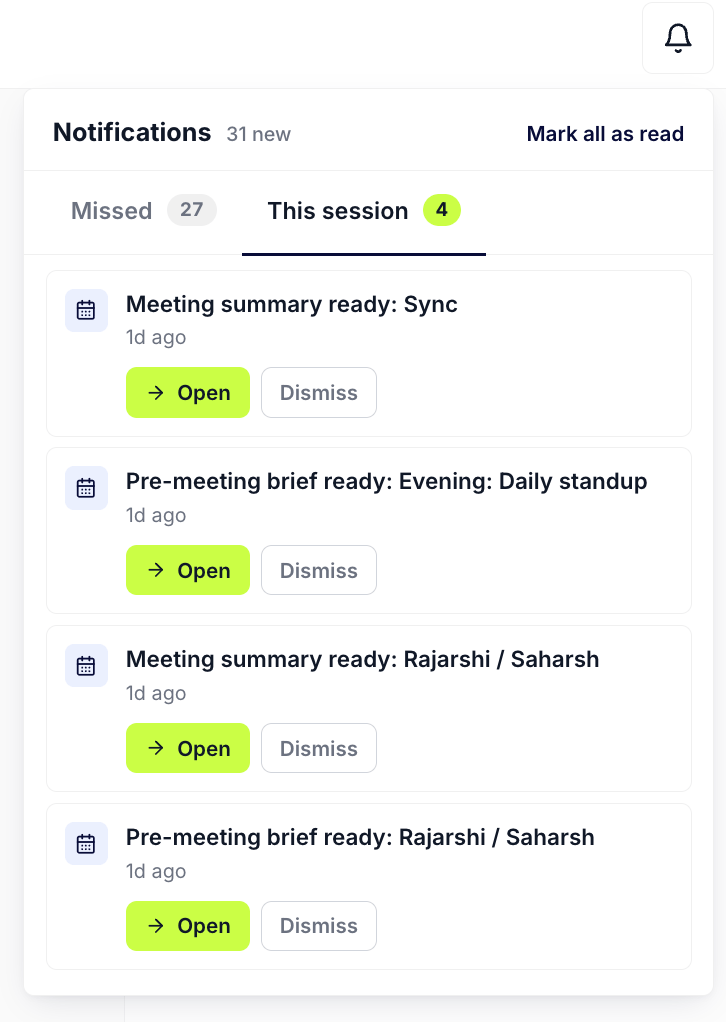
The Notification Bell popover with tabs and category cards
What you can do here
- Open the Bell as your inbox. The Bell sits in the top-right of every page with a count badge of items new since you last opened it. Clicking it opens a popover with two tabs: This session lists every notification that fired live while you’ve been signed in; Missed lists the pending-state buckets the live channel didn’t reach, queried fresh on every open so resolved items drop out.
- Read by category. Inside the popover, notifications are grouped by category: Signals, Actions (drafted emails, AI-proposed field updates, AI-created tasks), Accounts (enrichment field suggestions), Meetings (summaries and pre-briefs). Categories with one to three items show each row individually; categories with four or more collapse into a grouped card you can expand in place or click through to the dedicated tab.
- Review and accept inline, without leaving the page. A field-update notification opens a navy box right inside the popover with the proposed change (“Stage to Negotiation”) and swaps the chips to Accept and Reject. Accept writes through to Salesforce; the row clears from both the Bell and the Toast deck on success. You never have to leave the page you were working on to make the decision.
- Open a drafted email in one click. Email-draft notifications carry a Review chip that opens the actual Gmail or Outlook draft in a new tab. The chip is the same in the Bell and on a Toast; the routing is identical because both surfaces read from the same store.
- Catch the live pop in the bottom-right. The Toast deck stacks up to three cards in the bottom-right corner, deliberately anchored above the Cmd+K pill so the two never collide. The newest card is in front, fully interactive; the previous two peek behind at a reduced scale. Items beyond three queue off-screen and surface as the front cards clear.
- Read the urgency from the tier. Standard notifications (Signals, meeting summaries, FYI account rows) auto-dismiss after thirty seconds with a volt-gradient countdown bar; hover pauses the timer. High-stakes notifications (anything that changes CRM data or sends a comm on your behalf) hold for five full minutes, render with a warning-tinted border, and force an inline Dismiss or Discard decision instead of a corner X. The AE has to decide, not just close.
- Dismiss a Toast and keep the row in the Bell. Closing a Toast clears it from the deck but keeps the row in the Bell’s This session tab. The Bell is the safety net for an accidental close. Resolving a row (Accept, Reject, opening the draft) clears it from both surfaces because the underlying recommendation is no longer pending.
- Mark all as read in one click. The Mark all as read link in the popover header advances the seen-state across every visible category, drops the badge to zero, and clears the This session tab. The “I scanned, I’m done” affordance for the end of a sweep.
- Toasts wait for you instead of expiring at your empty chair. The countdown pauses whenever you switch away from the tab or go idle, and resumes when you come back. A notification that fired while you were in a meeting is still there, still counting, when you sit down. The days of finding out something needed a decision only after it had already timed out are over.
- Anything you didn’t act on comes back. High-priority suggestions you never resolved, unsent AI-drafted emails, pending field updates, quietly re-surface as toasts while you’re working, capped at two at a time so they nudge rather than flood. Field-update toasts carry the suggested change inline so you can accept or reject without navigating away, and email-draft toasts link straight to the draft in Gmail or Outlook.
- Nothing is lost if you dismiss it. Whatever pops is also held in the Bell, split into Missed (fired while you were away) and This session, each row still carrying its own Review and Dismiss controls. Dismissing a toast clears the interruption, not the item.
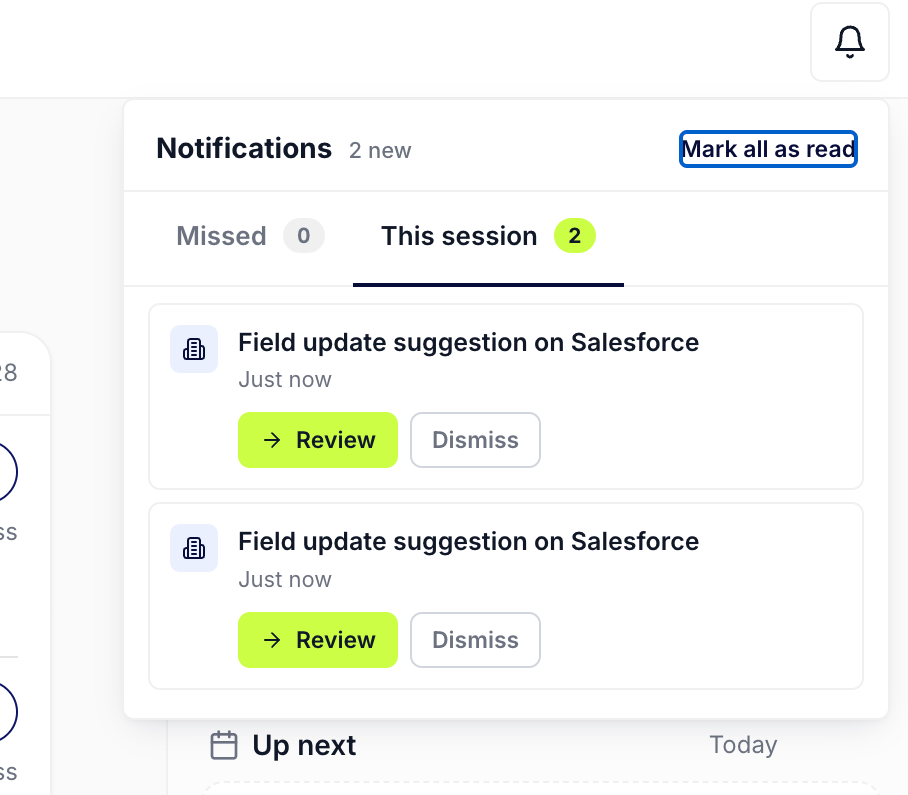
Anything you do not act on is kept in the Bell, split into Missed and This session
How to use it
A rep mid-conversation on a Tuesday afternoon is editing a deal page when the Toast deck pops a high-stakes card in the bottom-right: a field-update suggestion on a different account proposing to flip Stage to Negotiation. She hovers the Toast so the five-minute timer pauses, clicks Review, reads the proposed change in the navy box, and clicks Accept; the Toast clears and Salesforce takes the write. She finishes the edit she was on, opens the Bell at the top of the hour, and sees This session is empty (she’s been acting on items as they fired). She switches to Missed, finds three Signals on accounts she opened last week, clicks the grouped card to land on the Signals feed, and sweeps them in the dedicated workspace. Seven minutes from the first pop to a fully cleared inbox.Patterns that work
Treat the Bell as the durable inbox and the Toast as the heads-up. The Toast is for “did you see this right now”; the Bell is for “what fired since I last checked.” When you’re heads-down on a different deal, let standard Toasts age out and catch them in the Bell at the next break. When a high-stakes Toast appears, decide in the deck so the row doesn’t linger in two places. Use Review-inline for field updates; click through for Signals. The Bell’s inline review flow is fastest for the per-cell field-update suggestions and account enrichments, the call is “Accept this proposed value or not.” For Signals, the value is in the dedicated feed where you can sort, filter, and scan in context; the Bell’s grouped Signals card click-through lands you there with no extra steps. Mark all as read after a real sweep, not before one. The link clears the badge and drops the This session tab. Use it when you’ve actually acted on the visible items, not as a way to silence noise; the source-of-truth pending tables still hold un-acted suggestions, so they’ll repopulate on the next open. The clean-up is real once you’ve worked through the queue. Let the tier do the routing for you. Anything that demands a decision is high-stakes by design: warning border, five-minute lifetime, must-decide inline chips. Anything that’s an FYI auto-dismisses in thirty seconds and lives in the Bell. The AE never has to set urgency; the system encodes it once per category and propagates everywhere.Related
- Act on a signal with Your Move - what to do with the signal once the toast or bell has put it in front of you.
- Signals - the org-wide feed; signal arrivals are the most common notification kind.
- AI Activity - the durable log of every notification you acted on and every AI action it kicked off.
- Actions - the inbox-style queue for working through pending AI suggestions at a sit-down pace.
- AI Suggestions - the per-cell accept-and-reject layer; accepted suggestions surface here as notifications.
- Triage from the notification Bell - the routine for clearing the Bell between meetings.
- Catch a signal as it fires - acting on a Toast the moment it pops.
- Knock out today’s actions in 15 minutes - the cross-surface sweep that starts at the Bell.