

Act on a signal with Your Move
Most signal programs die the same way. The feed works, the signals are real, the rep reads them, and then nothing happens, because “a funding round closed at an account I cover” is information, not an action. The distance between noticing and doing is where the value leaks out. Your Move is the bridge. Every Signal Card now carries the recommended play, the reason it’s timely, and a button that hands the whole thing to the AI. This play is the two minutes it takes to walk that bridge.What to expect
- Timing. 2 to 4 minutes from open card to a queued draft.
- Prerequisite. At least one signal type enabled and a signal sitting in your feed, the Bell, or Do This Now. The account should have an AI-active opportunity for the assistant to reason against.
- Outcome. A touchpoint that references the thing that actually happened, drafted and waiting in your mailbox, rather than a note-to-self you’ll never return to.
Step-by-step
- Open the signal from wherever you met it. The feed, a Toast, the Bell, the per-account Signals sub-tab, or the Do This Now rail on Home. It’s the same card everywhere, and the same Your Move block sits inside it.
- Read the tier and the summary first, but don’t stop there. The Critical / High / Medium / Low tier tells you whether this is worth two minutes, and clicking the label shows exactly why it ranks where it does (deal stage, days to close, deal size, freshness). The AI summary tells you what happened. Neither tells you what to do, which is the actual question and the one reps historically answer badly under time pressure.
- Read Your Move. The block names a specific action, the reason it is timely, and the concrete next step. The value is in the second part: a hiring signal is not “they’re hiring,” it’s “the headcount blocker your champion raised in discovery just cleared, and the window is now.” That connection between an external event and what you already know about the deal is the thing you would otherwise have to make yourself, at speed, forty times a week.
- If there’s no specific play, generate one. Some signals are real but generic. Those cards show a Generate suggestion button instead, so the answer is never a dead end; you get a proposed move rather than an empty block.
- Hit Take action. The AI assistant opens already holding the signal, the account, and the deal. You do not re-explain the situation, paste a link, or summarise the news. Ask for the outreach and the draft comes back written against this specific event rather than against a template.
- Read the draft like a human wrote it, because you’re about to send it as one. The draft will reference the funding round or the leadership change directly. Check that the reference is accurate and that the tone matches the relationship; a champion you’ve known for a year and a cold economic buyer need different registers. Adjust tone or length in the composer rather than rewriting by hand.
- Save to your mailbox and accept the signal. The draft lands in Gmail or Outlook for a final read. Accept the card, which clears it from the feed, the Bell, and any toast still carrying it. The signal is now a touchpoint rather than a row.
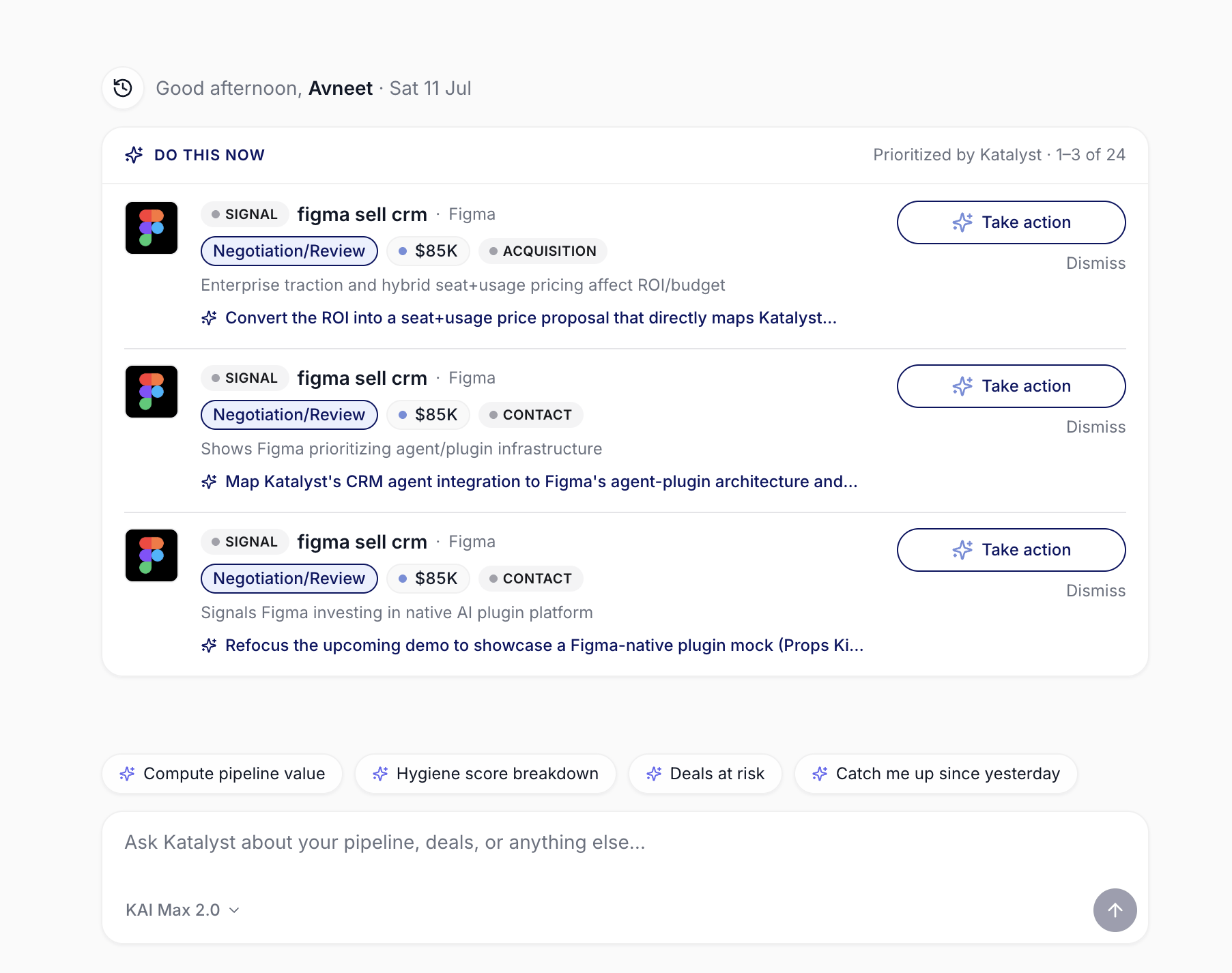
The recommended move also rides along in Do This Now, one line under each signal, with Take action beside it.
Patterns that work
Act while the card is open, or accept that you won’t. The honest failure mode is accepting a signal with the intention of coming back to it. Almost nobody does. If the move is worth making, make it now, while the context is loaded and the button is right there. If it isn’t worth two minutes, accept the card and move on without pretending. Speed is the whole point on time-boxed signals. A hiring surge, a funding round, a leadership change: these have windows measured in days, and the value of the outreach decays fast. Your Move exists so the reply goes out while the news is still news, not after it has been in your feed for a week. Work Do This Now when you don’t have time for the feed. The recommended move rides along into the Do This Now rail on Home, one line under each signal with Take action beside it. On a day where you never open the Signals tab, the top few signals still get acted on from the landing page. Disagree with the move when you know better. Your Move is a recommendation built from what Katalyst can see, and you were on the last call. If the play it suggests is wrong for this relationship, take the action anyway and steer the assistant with your own instruction; you keep the loaded context and lose nothing but the suggestion.Related
- Signals - the feed and the Signal Card where Your Move lives.
- Notifications - the Bell and Toast surfaces that carry the same card, and the same move.
- Draft Email - the composer that Take action usually lands in.
- Home - the Do This Now rail, where the move surfaces without opening the feed.
- Catch a signal as it fires - the in-the-moment triage play, for when a Toast interrupts you.
- Start the day with Signals - the morning scan this play finishes.
- Research from a fresh signal - the deeper path, when the signal warrants research before outreach.