

Start the day with signals
The rep signs in, pours coffee, and opens Katalyst. Before the inbox, before the calendar, before the first call, there is a 10 to 15 minute window where the question is simply: what fired on my book overnight, and what does it change about today? This play turns the global Signals feed into that morning ritual: scan the overnight feed top-to-bottom, triage every card into one of three buckets (act, research, dismiss), and end with a clean feed and a sharper plan for the day.What to expect
- Timing. Roughly 10 to 15 minutes, once a day.
- Prerequisite. At least one signal type is enabled in settings so the feed actually populates, and the rep owns Salesforce opportunities so signals fire against their book. The signal fetch runs at 8:00 AM and 1:00 PM EST on weekdays; running the play after the 8 AM tick is the natural fit.
- Outcome. Every overnight signal is triaged. The active feed is clean, two or three accounts have been bumped into the day’s plan, and the rest of the day starts oriented rather than reactive.
Step-by-step
- Open the global Signals tab. Click Signals in the side nav. The feed defaults to Active status, sorted by Katalyst Score descending, so the highest-priority overnight items sit at the top. The first scan is just shape: how many cards, what types dominate, are there any 90-plus Critical scores in view.
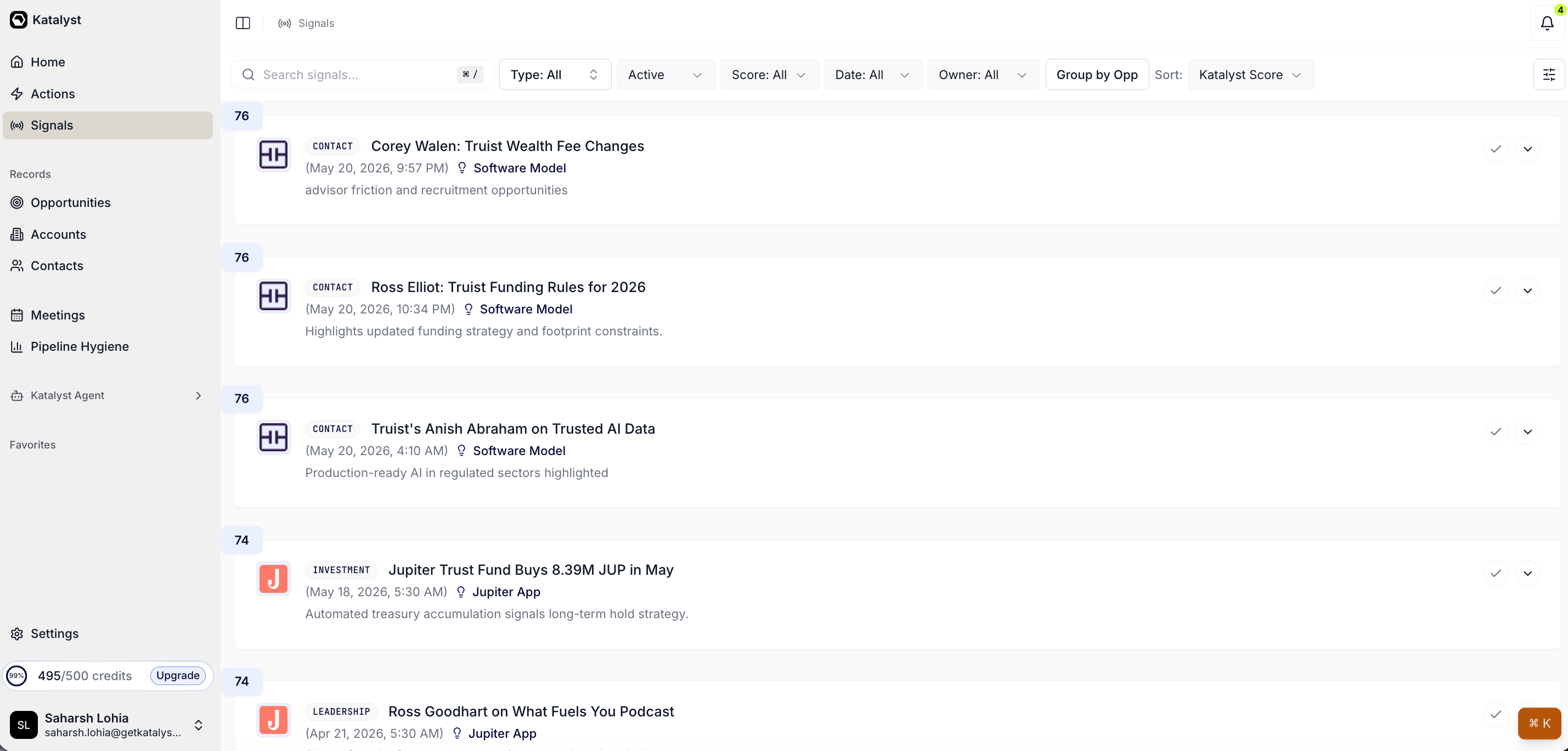
Global Signals feed, sorted by score, scoped to the rep's owned opportunities.
- Scan what fired since yesterday. Optionally narrow the Date filter to Today or set the Score filter to High to focus the scan. Read each card’s title and one-line AI relevance statement; do not expand yet. The goal of the first pass is to build a mental shortlist of which cards are worth a real read.

Signal card close-up: score badge, type tag, AI relevance line, accept icon.
- For each card on the shortlist, decide act, research, or dismiss. Expand the card to read the full AI summary and the suggested next steps. Three paths from here. If the rep already knows what to do (a hiring signal on a known champion’s team, an earnings beat on a deal mid-negotiation), it is an Act. If the signal needs more context before a move makes sense, it is a Research. If the signal is real but not relevant to the rep’s book today, it is a Dismiss.
- Research path: drill into Account detail. Click through the linked opportunity name to jump to the Account detail page. Read the Overview to orient on deal state, then optionally check the Account Plan and the per-account Signals sub-tab to see if other signals on the same account stack with this one. If a clear move emerges, flip to Act. If not, drop a Note on the account naming what would change the read and move on.
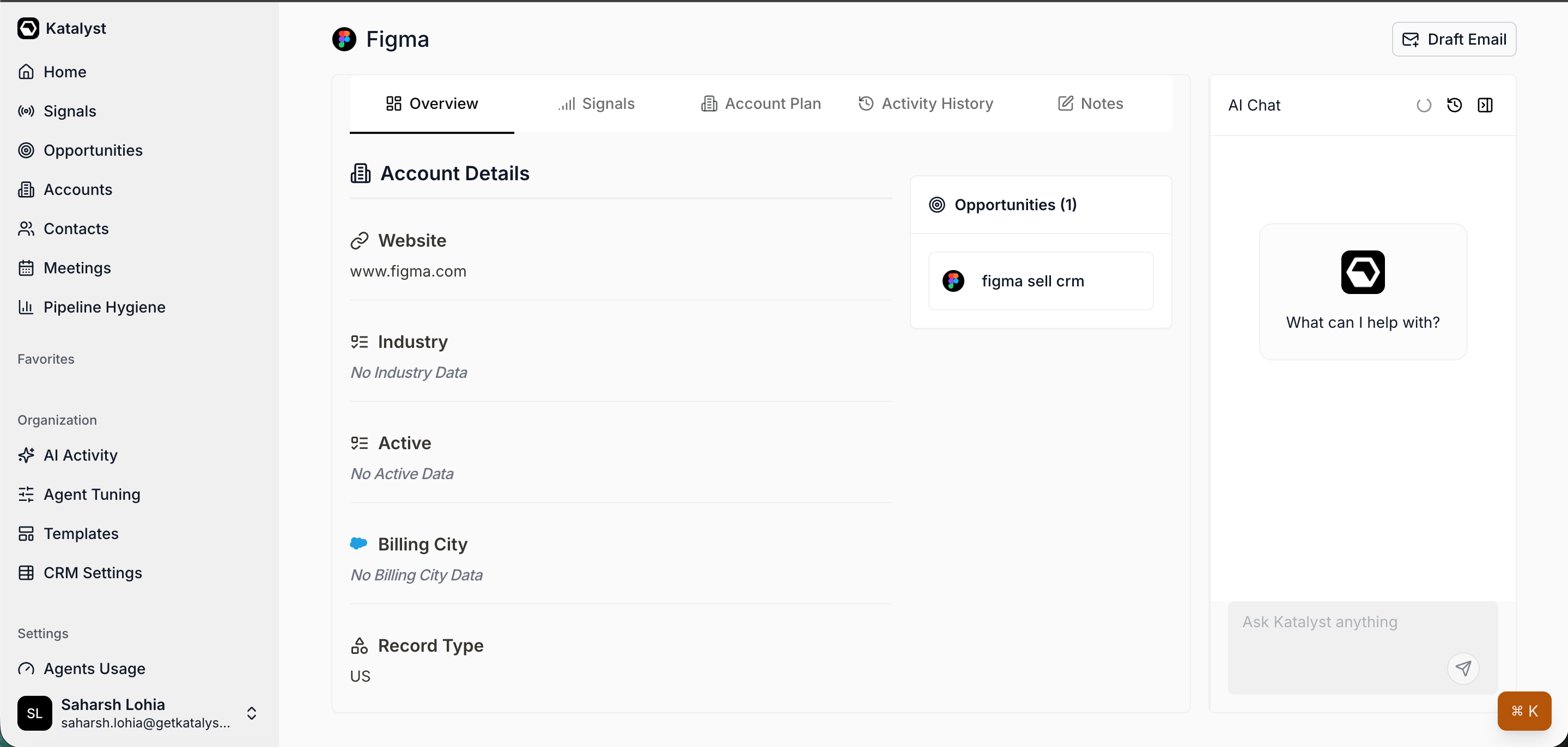
Account detail Overview, the workspace the research path drills into.
- Act path: open Draft Email. From the expanded card on the feed, or from the strategic-challenge card the signal best maps to on the Account Plan, open Draft Email. The composer prefills the challenge and signal context; the rep tunes the prompt to reference the fresh event explicitly and saves the draft to Gmail or Outlook for a later send.
- Dismiss path: accept the card. Click the check icon on the Signal Card. The card archives server-side and drops out of the active feed. The signal is not deleted; switching the Status filter to Archived restores it later if needed. Accepting is the AE’s signal that this one has been considered and resolved.
- End with a clean feed. When the shortlist is worked, the active feed should be either empty or down to the residual low-relevance cards. Either accept those (a low-score acquisition signal on a tier-3 account is usually fine to clear) or leave them for the 1 PM fetch tick to refresh against. The day’s work begins from a known state.
Variations
- Finish the scan, don’t just do it. Each card now carries Your Move: the recommended play, why it is timely, and a Take action button that opens the assistant already holding the signal. The scan is only worth the time if signals turn into touchpoints, and this is the step that makes that happen. Act on a signal with Your Move is the dedicated play.
- On a day with no time for the feed, work Do This Now instead. The recommended move rides along into the Do This Now rail on Home, one line under each signal with Take action beside it. The top few signals still get acted on without opening the Signals tab at all.
Related
- Research from a fresh signal - the deeper play to run when an act-path card needs the full 10-to-15-minute treatment.
- Catch a signal as it fires - the mid-day cousin: the same triage decision, but the trigger is a Toast pop, not a morning scan.
- Tune your signal noise budget - the monthly tune-up play to run when the morning feed is firing too much or too little.
- Triage from the notification bell - the cross-category morning catch-up if the rep wants everything (signals plus actions plus meetings) in one pass.
- Build your daily focus list - the natural next play after the feed is clean.
- Signals - the surface this play lives on.
- Account detail - the workspace the research path drills into.
- Draft Email - the composer the act path hands off to.